# Adventures in 0.75mm
**URL:** https://forum.lulzbot.com/t/adventures-in-0-75mm/235
**Category:** Hardware
**Created:** [August 3, 2013, 8:03pm UTC](https://forum.lulzbot.com/t/adventures-in-0-75mm/235 "2013-08-03T20:03:25Z")
**Posts on this page:** 3
**Page:** 1
### Author:  [@davidwood](https://forum.lulzbot.com/u/davidwood)
#### Post date: [August 3, 2013, 8:03pm UTC](https://forum.lulzbot.com/t/adventures-in-0-75mm/235/1 "2013-08-03T20:03:25Z")
One of the first things I wanted to print was a simple little barrier to keep my cats out of the printer’s shelf when it’s not in use. Knowing nothing and guessing much, I settled on a large, thin model that would use a lot of the Taz’s bed, and figured I’d better print it in ABS, for durability.
[4-hex 5\_10mm 17mm thick.stl](https://forum.lulzbot.com/uploads/short-url/1kithBtAho4UEy8vBEqtQQeyiqi.stl) (388 KB)
With the 0.35mm nozzle, after much drama, I successfully ran one off (barely), but it took many, many hours of print time (multiplied by the typical beginner failed-to-succeeded print ratio). I started to get very interested in the larger nozzle diameters.
Aleph states that the 0.75mm is “still currently experimental.” Well, so is the entire 3D printer hobby. 🙂 After suffering through the difficulties of changing nozzles to begin with (documented elsewhere) I finally got to the point of configuring slic3r. I knew to adjust the nozzle diameter (obviously), but the rest… how does one know what slic3r needs to know in these cases?
I started with the Taz “high\_speed.ini” - after all, the whole point of this was to quickly print something big, with no care for fine details. I looked at ([http://nathan7.eu/stuff/RepRapCalculator/RepRapCalculator.html](http://nathan7.eu/stuff/RepRapCalculator/RepRapCalculator.html)) which led me to also adjust the layer height (0.4 at first) and fired it up. My first prints looked like this:
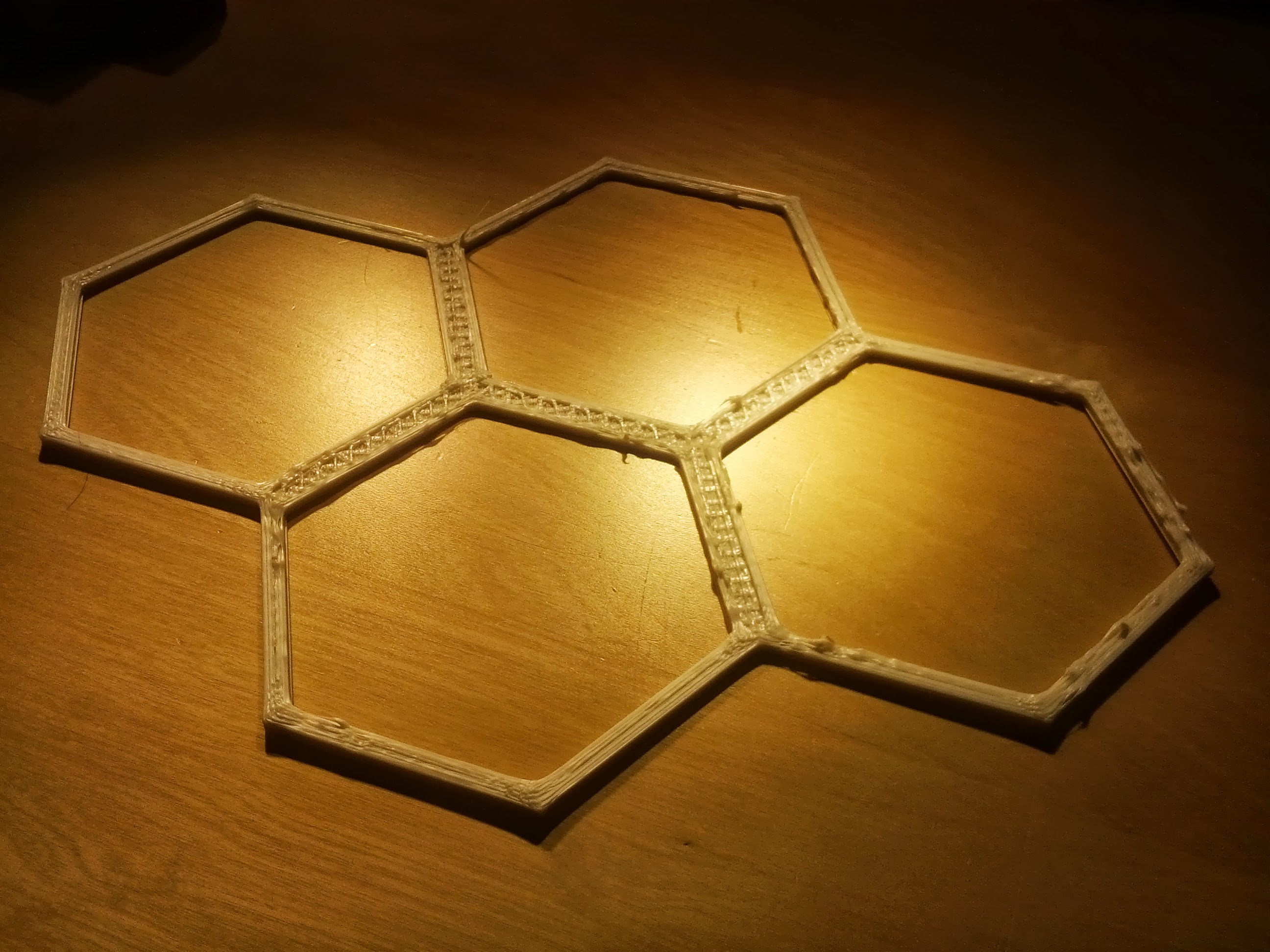
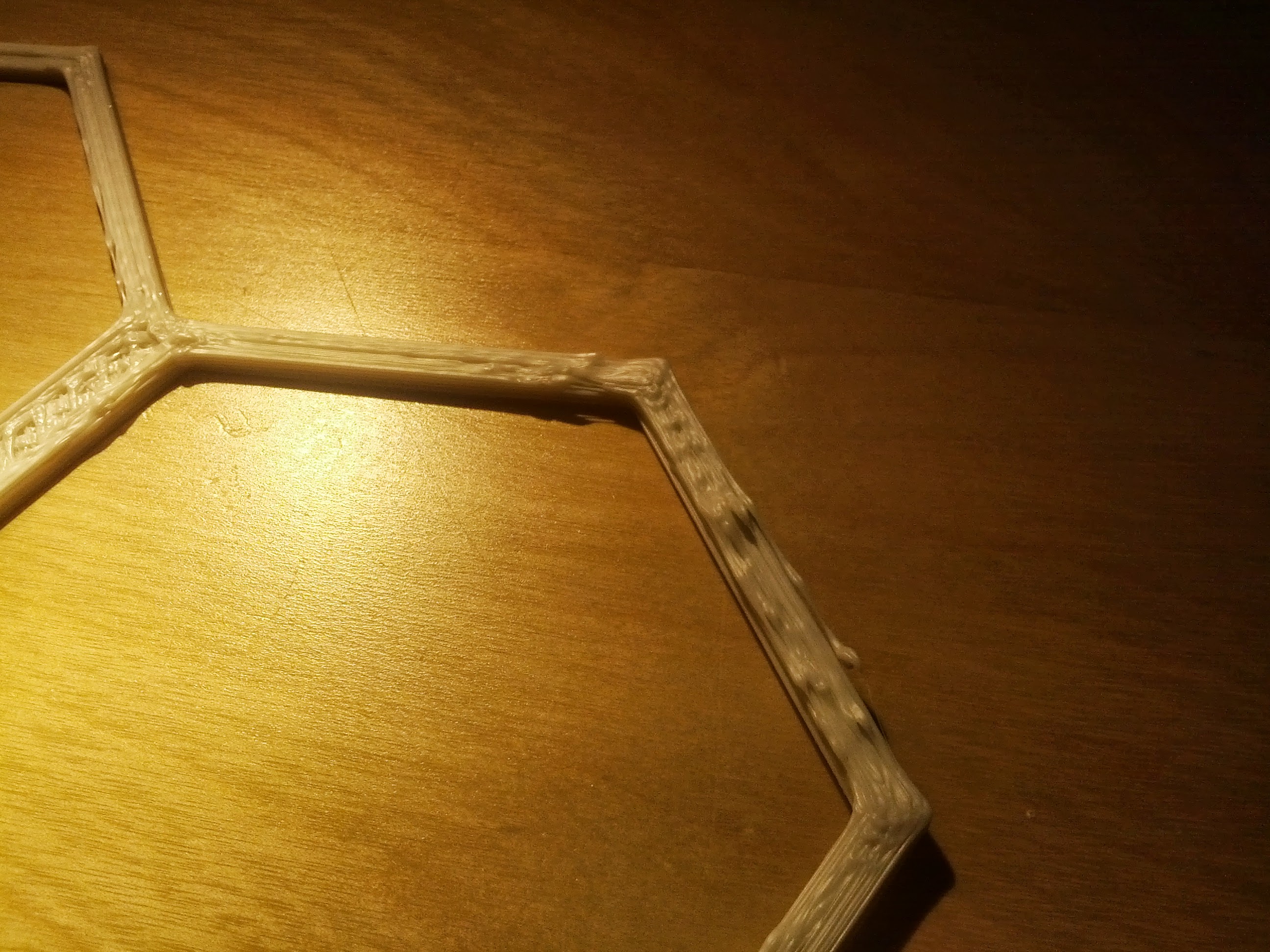
Promising at the start, but with way too much solid infill, and after a layer or two, things started getting really ugly: uneven, poorly adhering strands of ABS that were full of beads and gaps. I might have already recognized what was going on, but it didn’t dawn on me immediately. Google didn’t turn up a lot of people printing at 0.75mm, but the folks at Aleph have always been incredibly patient and helpful, and also good at teaching me to fish. They sent me to [http://richrap.blogspot.com/2012/01/slic3r-is-nicer-part-3-how-low-can-you.html](http://richrap.blogspot.com/2012/01/slic3r-is-nicer-part-3-how-low-can-you.html) and [http://reprap.org/wiki/Print\_Troubleshooting\_Pictorial\_Guide](http://reprap.org/wiki/Print_Troubleshooting_Pictorial_Guide) - the extensive discussion of speed finally getting me to notice my extruder temperatures in pronterface, which looked something like this, but worse:

At 0.75mm, it seemed that the Budaschnozzle 2.0 wasn’t able to maintain a high enough temperature when moving above certain speeds. Of course! I’d just more than doubled the volume of plastic it had to heat. I switched to the “high\_quality.ini” - with its slower speeds - as a base, and got an immediate, drastic improvement. But, I was now extruding way too much plastic. By dumb luck I found my way into the Advanced tab. high\_quality.ini has many tweaks to the extrusion width, undoubtedly intended to optimize for the 0.35mm nozzle. (Note to self, future pull request idea: slic3r sanity checks and warnings.) With a few quick tweaks, I had the extrusion widths about right (0.83mm overall, and 1mm for the first layer). And suddenly prints started looking decent.
I was simultaneously trying to up my nozzle temperature. At 250C, I got immediate errors out of the printer. It obviously did not like getting that hot. OK, I only tried it because the manual claims there’s a 215-250C range for printing ABS (page 46)… OK, let’s try 245. At that temperature, what I found was that I could print for a while, but was liable to see a temperature-related shutdown in mid-print, since the temperature fluctuations based on speed could swing me up to 250C again. So, 240C. Now I was getting far enough to see my prints failing because of warping. Even with ABS/acetone solution, I’m coming off the bed something awful:
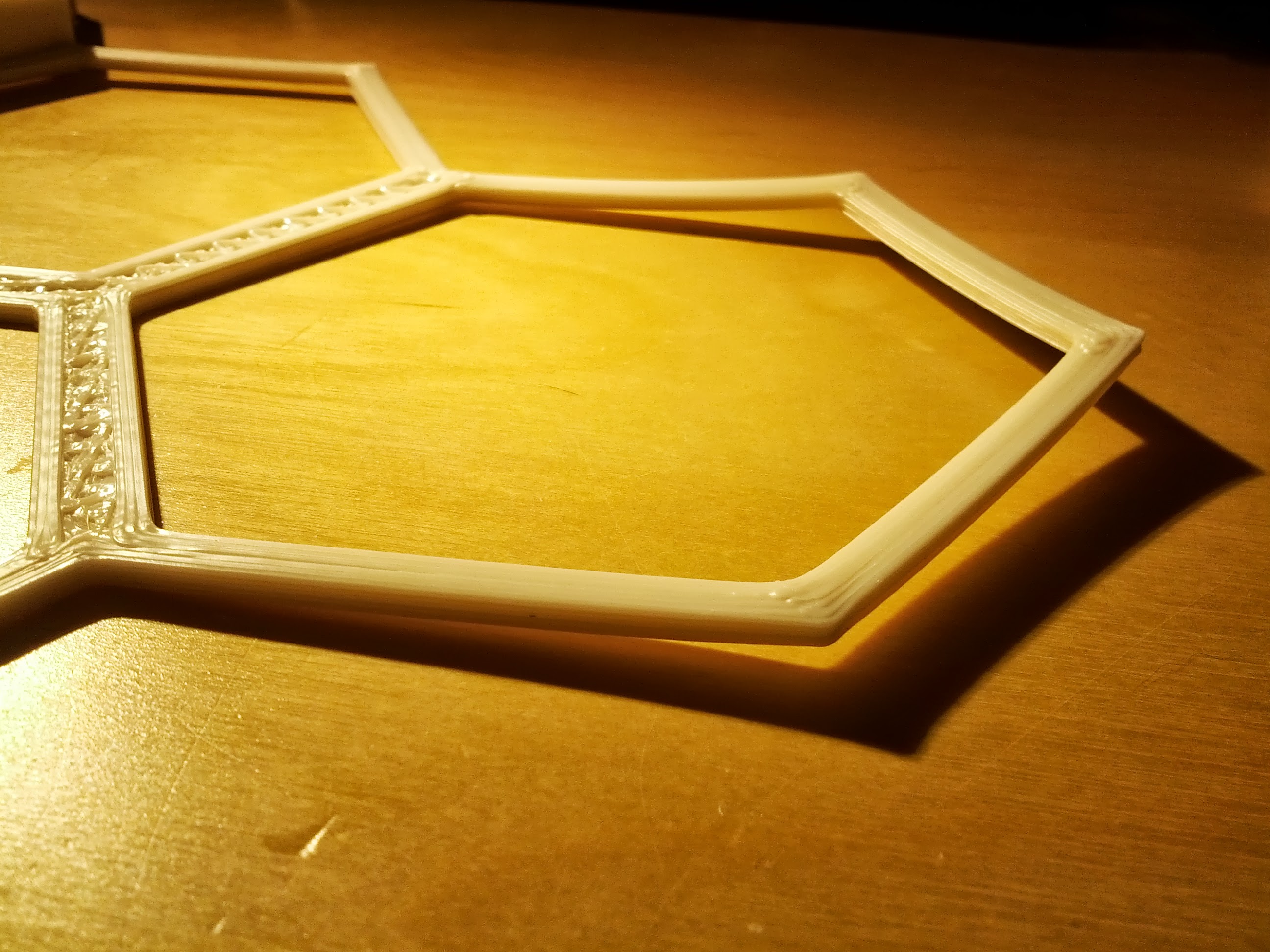
I bump the bed temperature from 85C to 110C (this has helped with warping in the past), and, checkmate. I’m knocking these out.
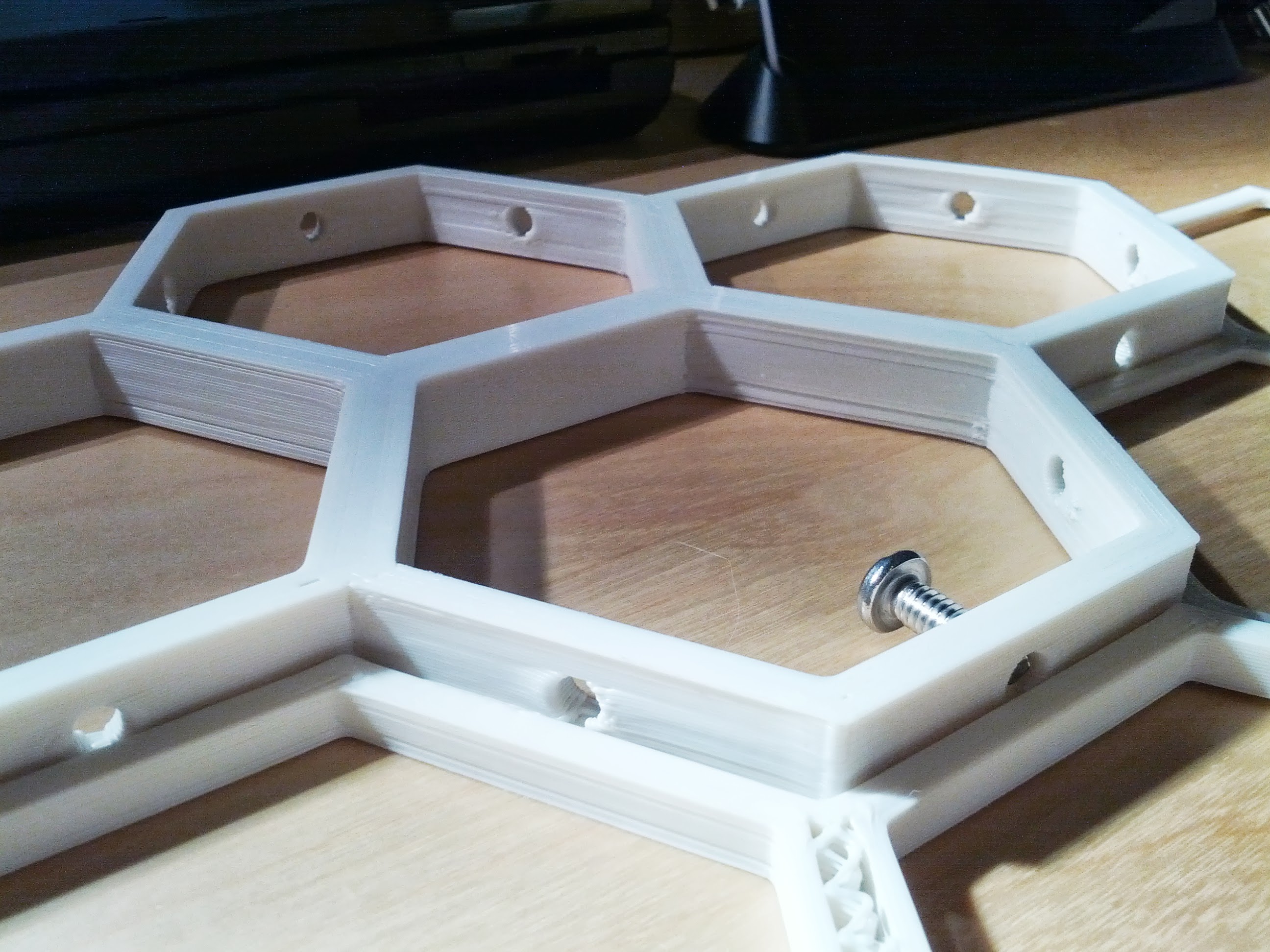
It’s very big, and yet it prints in about an hour. As many of these as you like can be held together with 0.25" x .75" stove bolts for whatever purpose.
In trying a few other prints, I can see that even at these slower speeds, printing long straight, bed-length perimter runs at 100mm/s is still too fast for the nozzle to maintain temperature. I’m still playing around trying to find the edges of the envelope.
All in all, a fun early experiment. All comments and suggestions from those with actual knowledge and experience would be more than welcome. 🙂
Printer:
```nohighlight
# generated by Slic3r 0.9.10b on Fri Aug 2 08:56:43 2013
bed_size = 298,275
end_gcode = M400 ; wait for buffer to clear\nM104 S0 ; turn off nozzle temperature\nM140 S0 ; turn off bed temperature\nG1 Y280 ; move Y axis\nG28 X0 ; home X axis\nM84 ; disable motors
extruder_offset = 0x0
gcode_flavor = reprap
layer_gcode =
nozzle_diameter = 0.75
print_center = 147,137
retract_before_travel = 2
retract_layer_change = 1
retract_length = 1.6
retract_length_toolchange = 3
retract_lift = 0
retract_restart_extra = 0
retract_restart_extra_toolchange = 0
retract_speed = 40
start_gcode = G28 ; home all axes
toolchange_gcode =
use_relative_e_distances = 0
vibration_limit = 0
wipe = 0
z_offset = 0
```
Print:
```nohighlight
# generated by Slic3r 0.9.10b on Fri Aug 2 21:54:52 2013
avoid_crossing_perimeters =
bottom_solid_layers = 2
bridge_acceleration = 0
bridge_flow_ratio = 1
bridge_speed = 60
brim_width = 0
complete_objects = 0
default_acceleration = 0
external_perimeter_speed = 70
external_perimeters_first =
extra_perimeters = 1
extruder_clearance_height = 20
extruder_clearance_radius = 20
extrusion_width = .83
fill_angle = 45
fill_density = 0.2
fill_pattern = hilbertcurve
first_layer_extrusion_width = 1
first_layer_height = 150%
first_layer_speed = 50%
gap_fill_speed = 40
gcode_comments = 0
infill_acceleration = 0
infill_every_layers = 1
infill_extruder = 1
infill_extrusion_width = 0
infill_first = 0
infill_only_where_needed = 0
infill_speed = 100
layer_height = 0.5
min_skirt_length = 0
notes =
only_retract_when_crossing_perimeters = 1
output_filename_format = [input_filename_base].gcode
perimeter_acceleration = 0
perimeter_extruder = 1
perimeter_extrusion_width = 0
perimeter_speed = 90
perimeters = 3
post_process =
raft_layers = 0
randomize_start =
resolution = 0
skirt_distance = 6
skirt_height = 1
skirts = 1
small_perimeter_speed = 40
solid_fill_pattern = rectilinear
solid_infill_below_area = 20
solid_infill_every_layers = 0
solid_infill_extrusion_width = 0
solid_infill_speed = 100
spiral_vase = 0
support_material = 0
support_material_angle = 0
support_material_enforce_layers = 0
support_material_extruder = 1
support_material_extrusion_width = 0
support_material_interface_layers = 0
support_material_interface_spacing = 0
support_material_pattern = rectilinear
support_material_spacing = 2.5
support_material_speed = 60
support_material_threshold = 45
threads = 1
top_infill_extrusion_width = 0
top_solid_infill_speed = 50%
top_solid_layers = 2
travel_speed = 150
```
---
### Author:  [@jebba](https://forum.lulzbot.com/u/jebba)
#### Post date: [August 5, 2013, 4:12pm UTC](https://forum.lulzbot.com/t/adventures-in-0-75mm/235/2 "2013-08-05T16:12:18Z")
Cool! Thanks for the detailed post. 🙂
---
### Author:  [@Tom\_On\_Mars](https://forum.lulzbot.com/u/Tom_On_Mars)
#### Post date: [August 7, 2013, 1:26pm UTC](https://forum.lulzbot.com/t/adventures-in-0-75mm/235/3 "2013-08-07T13:26:24Z")
Good post indeed!
I shorted multiple parts out on my TAZ when trying to install a .5 nozzle and my Digi key parts are coming in today.
I plan to document exactly what part #s, and how I got about it all and what I learn sometime this week or next week.