# Taz 5 with ARCHIM2
**URL:** https://forum.lulzbot.com/t/taz-5-with-archim2/23263
**Category:** Development
**Created:** [April 20, 2021, 6:51pm UTC](https://forum.lulzbot.com/t/taz-5-with-archim2/23263 "2021-04-20T18:51:41Z")
**Posts on this page:** 19
**Page:** 2
### Author:  [@billyd](https://forum.lulzbot.com/u/billyd)
#### Post date: [February 4, 2022, 10:40pm UTC](https://forum.lulzbot.com/t/taz-5-with-archim2/23263/21 "2022-02-04T22:40:34Z")
I will upload my latest files tonight in an hour or so. Sorry I am not by that computer at the moment
---
### Author:  [@billyd](https://forum.lulzbot.com/u/billyd)
#### Post date: [February 4, 2022, 10:45pm UTC](https://forum.lulzbot.com/t/taz-5-with-archim2/23263/22 "2022-02-04T22:45:30Z")
Yes it should connect to the two mating headers on the archim board, however as I recall the connector housings are installed 180 degrees out of position. That is probably why the lcd is not working for you. You can pull the plastic housing off the pins rotate, and reinstall. I mentioned this to ultimachine but I’m assuming they weren’t about to fix every board they have in stock
---
### Author:  [@TheShike01](https://forum.lulzbot.com/u/TheShike01)
#### Post date: [February 4, 2022, 10:55pm UTC](https://forum.lulzbot.com/t/taz-5-with-archim2/23263/23 "2022-02-04T22:55:57Z")
I am having issues compiling in vscode. I followed the teach tech guide but got kind of lost because this is not using a ordinary mother board. I believe I have everything modified correctly in the configuration.h file, but I do not feel confident about my pio file. Do I just need to set the default\_envs = DUE\_Archim in the .ino file? Or should there be more code?
---
### Author:  [@billyd](https://forum.lulzbot.com/u/billyd)
#### Post date: [February 5, 2022, 12:00am UTC](https://forum.lulzbot.com/t/taz-5-with-archim2/23263/24 "2022-02-05T00:00:00Z")
Yes just set DUE\_ARCHIM as the default environment and compile per teaching tech’s video (auto build Marlin) but send it to the usb port instead of a file. And of course make sure the src\_dir is Marlin and include\_dir is Marlin unless you changed the default directory structure (bad idea) when you unzipped the marlin2 code
---
### Author:  [@billyd](https://forum.lulzbot.com/u/billyd)
#### Post date: [February 5, 2022, 12:16am UTC](https://forum.lulzbot.com/t/taz-5-with-archim2/23263/25 "2022-02-05T00:16:18Z")
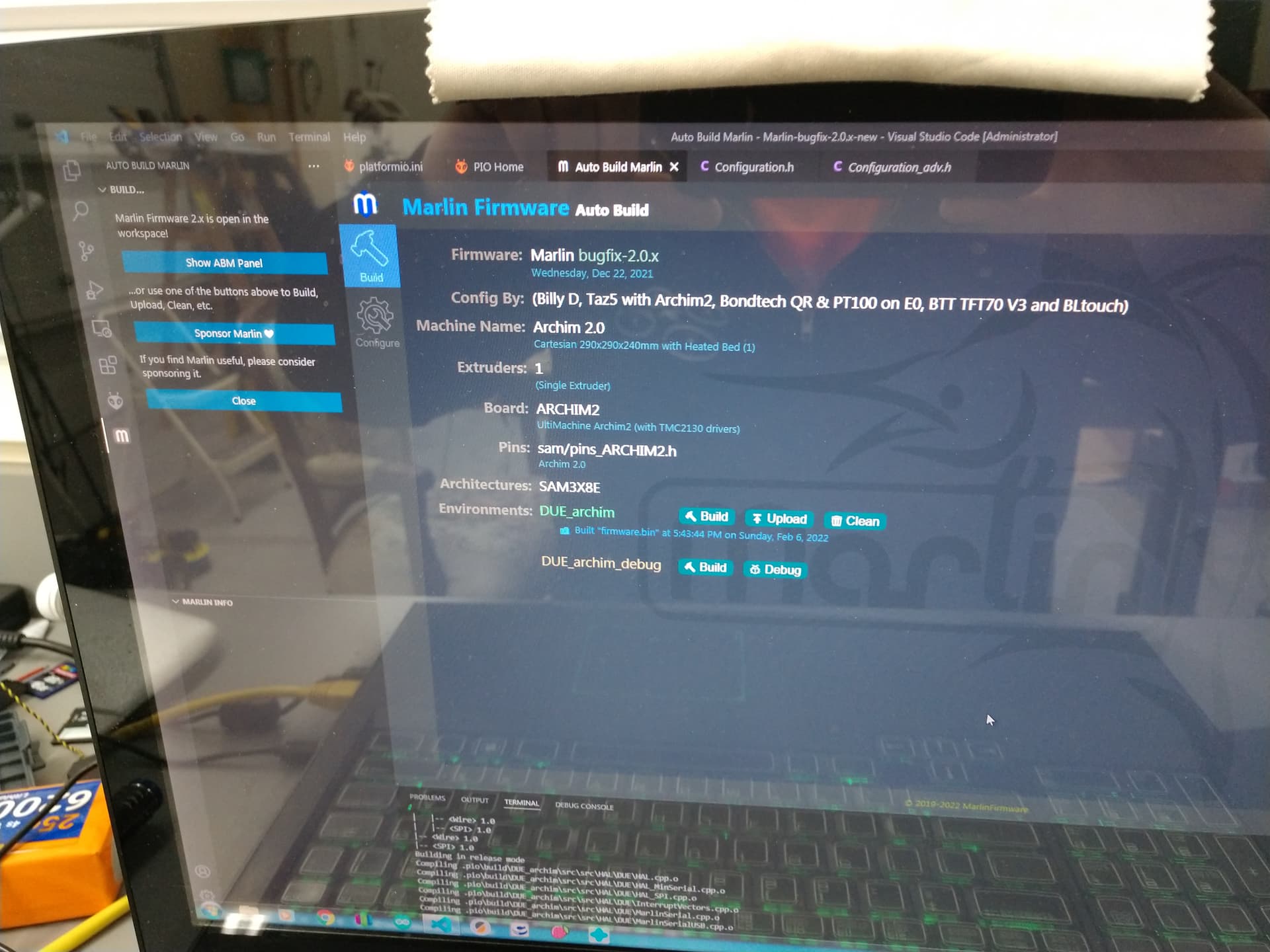
You want to start auto build marlin. Show ABM panel and you should see your firmware name listed at the top, if you edited the configuration by line in the config.h it shows up below that, and then the name you gave your computer (if you edited that). You should see the board as Archim2 and the pins file should be for Archim2 below that. Finally architecture should be SAM3X8E (this happens automatically).
Then you’ll have two different potential builds, you select the one that’s not debug, and you click on upload. Your printer has to be on and connected via usb. If the usb isn’t recognized you’ll have to hold the erase button on the board and then press the reset button to re-enable the usb port
---
### Author:  [@billyd](https://forum.lulzbot.com/u/billyd)
#### Post date: [February 5, 2022, 12:20am UTC](https://forum.lulzbot.com/t/taz-5-with-archim2/23263/26 "2022-02-05T00:20:48Z")
BTW don’t use stealthchop it’s no good for the Taz 5. I tried it and it just causes problems.
Also you really should use a bed probe if you’re not. The biggest advantage of 32 bit and Marlin2 is you can create a 10x10 mesh of your bed and store it in the eeprom and then you only have to redo bed probing when something gets changed or you start having first layer problems.
---
### Author:  [@billyd](https://forum.lulzbot.com/u/billyd)
#### Post date: [February 5, 2022, 12:25am UTC](https://forum.lulzbot.com/t/taz-5-with-archim2/23263/27 "2022-02-05T00:25:59Z")
Here is my latest config files (the other files I change if you read earlier in this thread remain the same) as of 12/21/21
Just revise the file extension from .gcode to .zip and then unzip to get the files
[Configs\_marlin2.gcode](https://forum.lulzbot.com/uploads/short-url/aJFAu0QkoIqnO4iGHT4We1QKSPt.gcode) (88.3 KB)
---
### Author:  [@billyd](https://forum.lulzbot.com/u/billyd)
#### Post date: [February 5, 2022, 12:29am UTC](https://forum.lulzbot.com/t/taz-5-with-archim2/23263/28 "2022-02-05T00:29:56Z")
Here is my platformio.ini file. Again download, and change the extension from .gcode to .zip and then unzip to get the file.
[platformio.gcode](https://forum.lulzbot.com/uploads/short-url/eX74tOm7jBFRT4xoUlqVXs4xveV.gcode) (2.7 KB)
---
### Author:  [@billyd](https://forum.lulzbot.com/u/billyd)
#### Post date: [February 5, 2022, 12:35am UTC](https://forum.lulzbot.com/t/taz-5-with-archim2/23263/29 "2022-02-05T00:35:10Z")
BTW if you aren’t using a probe make sure Z\_MIN\_ENDSTOP\_INVERTING is true for the Taz 5 in the configuration.h file
---
### Author:  [@TheShike01](https://forum.lulzbot.com/u/TheShike01)
#### Post date: [February 5, 2022, 1:14am UTC](https://forum.lulzbot.com/t/taz-5-with-archim2/23263/30 "2022-02-05T01:14:21Z")
> [@billyd](#):
>
> [code](https://forum.lulzbot.com/uploads/short-url/aJFAu0QkoIqnO4iGHT4We1QKSPt.gcode) (88.3 KB)
Okay awesome, I’ll see what I can get done tonight. I plan on using a probe I am just kind of upgrading iteratively. I am figuring things out quicker than anticipated. Thank you again for all your help.
---
### Author:  [@TheShike01](https://forum.lulzbot.com/u/TheShike01)
#### Post date: [February 6, 2022, 10:06pm UTC](https://forum.lulzbot.com/t/taz-5-with-archim2/23263/31 "2022-02-06T22:06:03Z")
Alright so I am now attempting to upload to the printer over vs code, and I am running into more issues. When I go to upload to the printer after I erase the firmware on the printer The code is compiling, but I am getting this error when it goes to upload to the printer:
Looking for upload port…
Auto-detected: COM6
Uploading .pio\build\nanoatmega328\firmware.hex
avrdude: stk500\_recv(): programmer is not responding
Could there be an issue with my board? I have a feeling I am doing some thing dumb and I just cannot figure what it is.
---
### Author:  [@billyd](https://forum.lulzbot.com/u/billyd)
#### Post date: [February 6, 2022, 10:50pm UTC](https://forum.lulzbot.com/t/taz-5-with-archim2/23263/32 "2022-02-06T22:50:08Z")
No it’s trying to build nanoatmega328. That’s not right. It should say something like .pio/build/Due\_Archim Are you using auto build marlin? Also make sure that after you do the erase/reset you disconnect the usb from your computer. Also power cycle the archim2 (turn your printer off and on) then reconnect usb to your computer. Check in device manager and tell me what it calls the device now connected to that usb port.
Also the file it should be creating is a .bin file, not a .hex file
---
### Author:  [@billyd](https://forum.lulzbot.com/u/billyd)
#### Post date: [February 6, 2022, 10:58pm UTC](https://forum.lulzbot.com/t/taz-5-with-archim2/23263/33 "2022-02-06T22:58:30Z")
Should look something like this when you are running Auto Build Marlin:
---
### Author:  [@TheShike01](https://forum.lulzbot.com/u/TheShike01)
#### Post date: [February 6, 2022, 11:57pm UTC](https://forum.lulzbot.com/t/taz-5-with-archim2/23263/34 "2022-02-06T23:57:58Z")
Okay I am now using auto build Marlin. For some reason though i I cannot get it to load your .ino file. It just keeps compiling for that incorrect printer platform. I figure it is an issue with where im compling the code so hopefully I can figure it out.
---
### Author:  [@TheShike01](https://forum.lulzbot.com/u/TheShike01)
#### Post date: [February 6, 2022, 11:59pm UTC](https://forum.lulzbot.com/t/taz-5-with-archim2/23263/35 "2022-02-06T23:59:50Z")
I am getting this error now when I compile just the .ino file:
Error: Unknown environment names ‘DUE\_ARCHIM’. Valid names are ‘include\_tree’
Am i missing a driver or library possibly?
---
### Author:  [@billyd](https://forum.lulzbot.com/u/billyd)
#### Post date: [February 7, 2022, 12:19am UTC](https://forum.lulzbot.com/t/taz-5-with-archim2/23263/36 "2022-02-07T00:19:26Z")
You don’t have the marlin project loaded into platform io. Watch the teaching tech video again and follow as he opens up the marlin folder.
You don’t need my ini file. Just open the platformio marlin project per the teaching tech video. The change the platformio.ini so the default enviroment is DUE\_ARCHIM. And make sure the directories in the ini file should read Marlin (assuming that’s where your code is and that’s how it unzips). It’s also the folder where your modded configuration.h and \_adv.h files are.
After that open Auto Build Marlin and it should look similar to the photo I posted. Then build and upload.
---
### Author:  [@TheShike01](https://forum.lulzbot.com/u/TheShike01)
#### Post date: [February 15, 2022, 11:16pm UTC](https://forum.lulzbot.com/t/taz-5-with-archim2/23263/37 "2022-02-15T23:16:31Z")
Alright, it has been a long process but I finally got it printing. Thank you again for your help. I want to do a bl touch in the future, but I am using an old laptop as an interface for it currently so I probably wont upgrade the LCD. I did get alot of heat creep issues at first, but figured out that I just needed to replace a few fans. I am considering upgrading the hot end I just don’t know quite yet what I want to do. Here’s a pic of the current set up.

---
### Author:  [@billyd](https://forum.lulzbot.com/u/billyd)
#### Post date: [February 16, 2022, 4:16pm UTC](https://forum.lulzbot.com/t/taz-5-with-archim2/23263/38 "2022-02-16T16:16:50Z")
I’m glad you got it sorted out. It’s complex in places and it’s hard to find all the information you need.
---
### Author:  [@TheShike01](https://forum.lulzbot.com/u/TheShike01)
#### Post date: [June 5, 2022, 8:31pm UTC](https://forum.lulzbot.com/t/taz-5-with-archim2/23263/39 "2022-06-05T20:31:26Z")
Well I am back to working on my printer I wanted to fix my damaged extruder carriage and add auto leveling so I have been following this guide: [Taz 5 + BLTouch [Project]](https://forum.lulzbot.com/t/taz-5-bltouch-project/5227)
I have run into some issues. I am at the point where my firmware is compiling, my wire connections are correct. The GPIO port was throwing me off but I am pretty confident I have that right. But when I turn on the printer I cannot get the blue LED to light up and the probe isn’t extending. I have a feeling it is a firmware issue or I done messed up the bltouch. Any advice for potential solutions or advice for troubleshooting would be greatly appreciated.
[Previous page](https://forum.lulzbot.com/t/taz-5-with-archim2/23263.md?page=1)