After reading up on the good feedback in here and having messed around with various slicers (mainly slic3r, cura, mattercontrol) I decided to buy Simplify3d.
Just did my first print with the default ABS settings no settings touched and it came out extremely well! Definitely a noticably better result than when using the default Slic3r profiles for ABS off the lulzbot page. I also felt the TAZ did much less unnecessary movements during the print as compared to slic3r sliced STLs.
Also loving the automatic error detection on the STLs and the way support is generated. Also the obviously pretty tought out interface.
One thing I do notice is the print estimates are quite off, estimated 90 minutes when it took around 20% longer but I guess that depends on the object and isn’t a big deal at all.
So far really satisfied, will report when I invested more time with the software. I know the results can surely be matched when using any free slicer but I like the convenience of using a tool which so far does everything quite well out of the box, has not crashed on me and managed to slice everything nicely.
Also the preview feature saved me a few hours already since I noticed faults in STL’s I wanted to print before starting the print.
I also fell into the same boat. Messed around a fair amount with slic3r, little bit with cura. It was actually trying to get the improved fan mount to turn out cleaner that led me to Simplify3D. Saw a few interesting reviews on Simplify3D and elected to try it out.
Adding a few quick thoughts to the earlier ones:
It feels close to MakerWare in terms of polish but better. Prior to owning a TAZ, I had checked the designs generated via OpenSCAD in MakerWare for cost in terms of filament.
It slices fast and does not crash
It prints beautiful parts. Huge improvement over slic3r. The support structures are extremely well done though I did need to tweak the minimum distance just a hair.
The depth of features in terms of customizing is quite nice. Not quite as deep as slic3r but deep enough. The layer varying settings on temperature / etc. is awesome.
Visualization of support / structure and being able to repair it is great.
Neutral:
The estimated time has not really bothered me. It is considerably more accurate than PrintRun at least getting it within an hour it seems. PrintRun seemed to never get it terribly right.
Dislikes:
While I think I have it dialed in now, early on there was a tendency to print beautiful but weak parts. The lack of a honeycomb internal structure is a bit troubling. I think now with 2.2 that I have it dialed in with the increased infill width and overlap but still need a bit more testing.
There are still sometimes a few nits requiring tweaking on the support when doing overhangs.
There are a number of minor nits on the interface. You have to manually reposition pieces and cannot drag them like in slic3r. It is easier to simply add another piece rather than increase copies as you can do with slic3r. It is terribly easy to delete a “process” which is kind of a pain. The process selection screen is not always intuitive in noting which processes apply. Stopping a print and some of the settings seem to behave a bit differently than I would expect.
The machine control interface on PrintRun is much better. The buttons are way too similar for Simplify3D whereas I thought the PrintRun interface is set up much more intelligently.
The first time I had PID gain issues cropped up with Simplify3D. It will sit their stupidly waiting for the bed to heat up forever being only .4 degrees off. This seems like a fairly simple tweak to detect it and react to it. Still wrestling a bit with this.
They really do need a trial version. I think it would sell immensely better if folks could try it out for a week.
Heads up, there are a lot of hotkeys in Simplify3D that aren’t well published. You can click and drag pieces on the print bed if you hold down control and the left mouse button will place (windows commands). I find this a lot easier than slic3r.
I really love Simplify3D and will have some comparison pics up from my KITTAZ between Simplify3D and Slic3r soon on this forum.
My only real gripe is that Slic3r is so commonly used that some of slic3r’s terminology and settings are considered the norm. This means on some of the few times where Simplify3D has different terminology or a different approach, the settings are a little hard to translate. You basically have to learn a new program. That being said the base profile of S3D has for the TAZ4 is WAY better than the Lulzbot profiles for Slic3r.
Heads up, there are a lot of hotkeys in Simplify3D that aren’t well published. You can click and drag pieces on the print bed if you hold down control and the left mouse button will place (windows commands). I find this a lot easier than slic3r.
Awesome. Not sure how I would have found that one but that will be much better than the manual edit / move that I have been doing so far.
I have been quite pleased with the default settings for the TAZ on Simplify. The only setting I did not care for was the setting with regards to perimeter overlap and the inner wall width.
Any folks interested in perhaps sharing their factory files?
Yeah objects can be moved by holding CTRL, I just hate it forces you to go into overhead view when doing so… sometimes you want to place a part under another part
You are right about the parts with same infill as Slic3r being weaker than coming out of slic3r. Dont understand why honeycomb infill isnt an option. I started using 50-70% infill for most prints but looking back when I had 20% infill prints out of slic3r that were surprisingly strong, that sort of sucks.
Also check your default filament diameter value, hidden in the process settings under “other” i think.
even in the TAZ4 default profile of S3D it’s set to 3mm which is too much for most filaments (default in slic3r taz profiles is 2.89…)
oh and your PID issues with heating up are not a S3D problem but a TAZ problem, calibrate your PID’s. I have to do so as well when I get the time as I also have the “heating up forever” problem…
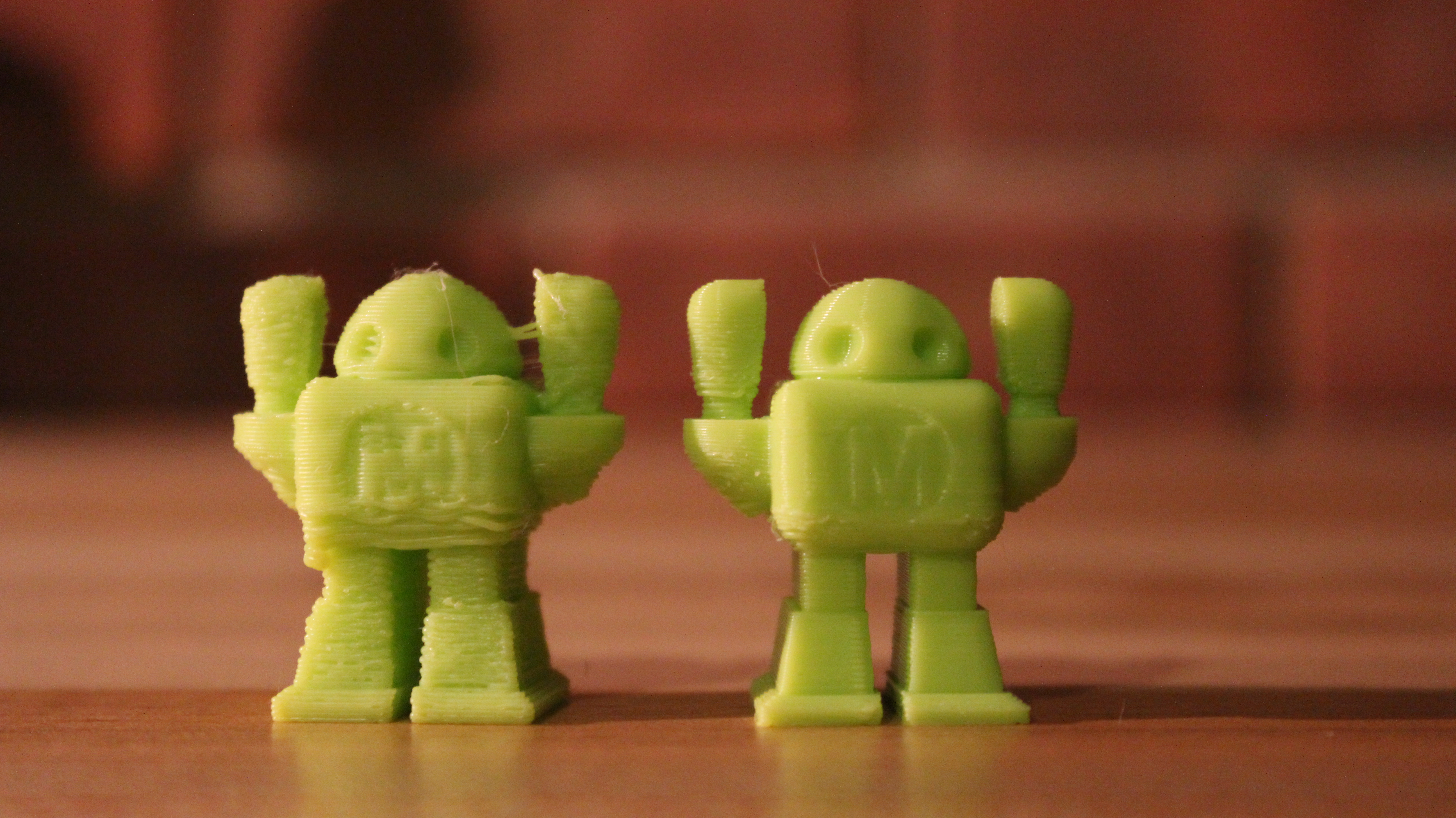
So here is a good comparison of the Slic3r profile for PLA (fine) that Lulzbot has, versus Simplify3D’s profile for the TAZ 4 (on medium settings). On both I have changed only the temperature, and the filament diameter. The make robot on the left is Slic3r, the make robot on the right is Simplify3D. Needless to say, I was happily surprised at the difference.
Is there a place to put the PID code or is it just something that needs to be invoked prior to starting the print via the Machine Controls window? I had read about a few issues with writing to the firmware and had not attempted (yet) to try to write the new settings to flash. Actually, it has been fairly tip top now removing the wait for the temperature to settle check box.
Thanks for the tip on the filament. I have been reasonably pleased so far with the quality with the filament size at 3 mm and will be curious to see how it changes the results (if at all). It might end up being helpful for the support structure which I ended up needing to move just a bit further away to keep it from blending into the perimeter. The support structure does seem quite excellent
Any suggestions on the infill angles and width / perimeter overlap? I have toyed around with a few settings but regardless of the settings, I have still not been terribly happy with the results.
I have a bit of spare ABS and will look into running a Cura versus Simplify comparison tonight provided last night’s print ends up working out. I was a bit underwhelmed by Cura trying it a few weeks back.
The lack of a prompt on the Remove Process listing is extremely annoying. I deleted two of my tuned processes this weekend.
it’s really as mentioned before just a slight adjustment to the stock profile.
The stock profile tends to give me glops in the corners on organic objects, that sort of fixes it but it’s not perfect (yet)
anyway give it a shot… Main things are changed filement width, retraction distance at 1,70 and coast at end on 0,2 mm TAZ4-optimized-config.zip (2.36 KB)
We’ve been using S3D in house for 6 months.
Hands down the best slicing program we have for our various printers. We’ve tried (beta’d) them all.
Just the ability to have a profile for a layer range and able to slice different profiles within the same model ramps it into a class on its own… where there is only S3D.
Taz 4
Taz 5
F100L
Type A 2013
Type A 2014
FlashForge
MB2
CTC (MB2 Clone)
WisePrintTek
Sure sure the no trial thing is not normal… however it IS the program. NO trial needed… just buy it.
Caveat emptor
I did and returned it 2 months later. I’m happy to reply to anyone offline about my experiences with it. It was one of the worse software experiences I’ve had - and I am a professional in the high tech software space and have seen a lot of stuff.
I switched from Slic4r/Repetier to S3D while printing on my PB Simple Metal. It was night and day… S3D is working great with the TAZ5 also.
Highly recommend S3D, but its not a necessity - I think Cura with enough time and tweaking could produce comparable results. But with S3D’s default profiles for the TAZ, you’ll be free of a lot of headaches.