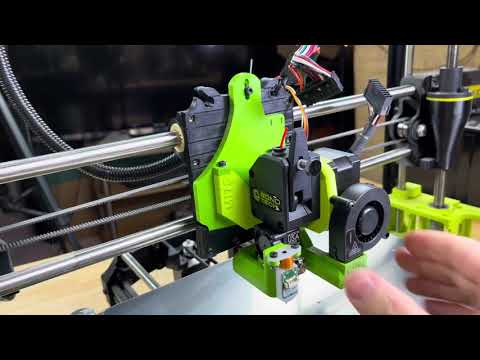
Ok, so just to appease my desire for “No Wobbles” - I’m stretching the top 5mm and the bottom area, since it has those 3 bevels, just turning the hole into an ellipse (like the top of the adapter has).
I mean, we print in microns, so wobbles are bad and I’d like to really make this a tad better.
Time to print and see how it goes.
1 Like
Okay, some updates!
New piece printed in ABS
I feel like the big issue i had was I was at the very top of the opening up top for the screw to go in. Extending that top area 5mm seems to have helped a good deal.
Video Summary
Files
STL -
PP-GP0355_v2-1_Aerodaptor_Taz_Mount_ABS-BLK UPDATED.STL (70.0 KB)
SolidWorks
Uhhh new problem.
She won’t power on.
I only touched the specified connections!
Where should I be looking?
Ok, if I unplug the BL Touch BLACK/WHITE wire it boots
So, I’ll update firmware then re-connect.
Ok after firmware update it asked “EEPROM Version Error Initialize EEPROM? IGNORE or RESET”
I hit IGNORE
I powered off the printer, plugged the WHITE BLACK cable back into the ZMIN per your diagram Board shows version 1.3L if that matters? I noticed the diagram you showed is a different version of the board?
Anyways…She won’t power in with that wire plugged in.
I feel like this is Dante’s Inferno. Every time I remedy one challenge, it is on to the next!
Awaiting your advice, @Wrathernaut
I followed this document to wire the BL Touch on both of my Rambo-based Lulzbot printers and it worked fine. Worked on a Workhorse and a Taz 6.
See if it helps.
Well I glanced through it and essentially it is the same wiring connections as @Wrathernaut shared earlier.
I might have a bad BL Touch cable? I’m not sure what else to try.
EEPROM should be reset, lots of different values and such stored in memory with that version of the firmware. Do the reset EEPROM option in the configuration before trying anything else.
Board version change put the video connectors in a different orientation, I believe that was the only significant change.
Ensure you’re not just going by colors, match the position on the wires.
You did mention digging that wire out of somewhere… maybe it’s faulty? Simple check with a multimeter can rule out a break in a wire.
No comments on my video? Ha you guys!!
I have another BL Touch wire that’s significantly shorter I can at least test with.
Everything is pinned and correct. But, it’s a $6 cable and historically its always the cheap part that bites you in the rear end.
Yeah, just slap a BLTouch on the short cable next to the board and see if it boots right after clearing the EEPROM.
Will do.
What menu options should I do once this is working?
You mentioned twist?
Also, what sort of grid will this perform?
I’m curious to do a G29 via the Bed Level plugin on Octoprint
Advanced Settings → Probe Offset → X-Twist Wizard (it’s off the bottom of the screen, so just scroll down). Even assuming everything was perfectly assembled in perfectly 3D printed parts, the toolhead is front heavy, so it’s going to try and tip forward. So at the middle of the gantry, further from support, you can get a minor tip forward in addition to the dip downward, resulting in a slight twist. Since the BLTouch is further than the nozzle from the X axis, any minor X axis twist will be amplified, so the probe Z offset changes based on the X axis location. X Twist Compensation | Marlin Firmware
It’s a 5x5 grid.
Edit - nevermind, link to Marlin Gotcha
Alas!
Some good news. The cable was the issue.
I flashed the firmware again and didn’t get any prompts, so all seems well.
Screen reads “AWC Blulzot 24.4.15.R” at the bottom
I did the X Twist you advised and I have never done that before. I just used the business card that comes with the BL Touch as my guide paper and did all 5 points.
I did the Z Offfset Wizard , I’m at -1.266 now.
Matterhackers shipped the longer cables today, so with any luck Friday or Saturday it will arrive here.
AWC Blulzot. Yep, that’s definitely the firmware I’m using.
The X-twist would do nothing with the nozzle as probe, so there would be no reason to have it enabled in factory firmware.
Can you elaborate on that? I’ve read that sentence a few times and not sure I follow along.
The X-twist just compensates for the difference in height of the nozzle and probe depending on the X position.
The Lulzbot washer-based leveling uses the nozzle as the probe. So the probe is the nozzle. There’s no difference in height from the probe and nozzle to compensate for - since they are one and the same.
If your probe and nozzle have the same Y offset, the twist compensation should be negligible, but since the toolhead is in a different X position to have the probe or nozzle touch the same spot on the bed, there could still be some difference in the actual offset.
Thank you for explaining that to me
BL Touch wires arrive Saturday, so I can go through the grand fun to tucking those wires in to the wire bundle all over again LOL
Okay well if you’re wondering how long a BL Touch wire to use, use one longer than 1 meter 
I just ordered a 1.5 meter and 2 meter one from Filastruder (nice people, too!)
I found with the 1 meter, I got from the hot end to almost where the wires enter the electronics bay. Just not inside!
So close!
The 1 meter works if you jankify your wiring like I did. But I recently tried to tuck the wire back into the wiring loom and yeah - too short.
I also just ordered from Filastruder!