The only upgrades from taz 4 to 5 were the hexagon hotend and the pei bedsheet. Everything else is the same. If you get those two upgrades, you’ll basically have a taz 5.
Yes, the hexagon works well with 1.75
Just got my TAZ 5 in the mail and am trying to get 1.75mm filament working because, like others, I already have lots of it. I can print for a few minutes, but then the filament starts to get kinked between the extruder gears and hot end. Anyone have a solution to this?
What type of filament? Make sure the little blower is always on. Try increasing temps by a few degrees… Doesn’t seem like the heater block is melting the filament fast enough.
Thanks for the quick reply. It’s Hatchbox PLA, and since posting I’ve been able to do several prints without having the issue present itself again. I loosened up the thumb screws on the extruder tensioner a bit and also raised the extruder temp to 205 in S3D, as I realized the PLA preset for the TAZ 4 has temp at 190, whereas Lulzbot’s Cura guide specifies that the TAZ 5 requires a higher temperature (probably the result of a more effectively-located thermistor).
A new issue I’m noticing is that there’s underextrusion for several cm after a retraction is performed… I suspect that this is a result of 1.75mm filament in a 3mm hole, so maybe I’ll have to dial in some retraction compensation. What retraction settings are you running?
EDIT: We’re back to kinking filament, so I’m still looking for a solution there as well.
I’m also getting kinking and underextrusion after retraction with red Hatchbox 1.75mm PLA on my LulzBot Mini. I’m using the default PLA medium settings except for diameter change in Cura. Smaller prints seem to be fine, but larger ones (perhaps more retraction) causes kinking.
I noticed lots of buildup on my hobbed bolt also. The solution is to reduce tension (I was thinking it needed more tension to tightly hold the smaller diameter of filament)? What’s the ‘default’ tension for the hobbed bolt?
Thanks,
Andy
I have never been able to get any 1.75 filament to print on my Taz 5. I’m scared to even try it on the mini because the mini is printing flawlessly right now. When the thread first started, I bought some 1.75 mm hatchbox pla from Amazon because it was only like 20$ a roll. I heated up to 240 to try and purge all of the hips out of the nozzle and then fed the pla through by hand until I could see the color change. Then I tightened the latch and began extruding in Cura. Worked like a charm. I tried a test print (mhackeny’s calibration disc) and the only thing it would do was spurt out of the nozzle. Never any even or consistent extrusion. I cancelled the print and then tried to extrude through Cura again and it worked fine again. Went to try to print again and the same thing happened. I even bought another roll of 1.75mm abs just to see if it was just an issue with the pla, but I got the same results. I would love to be able to get the filament to work as it is more cost effective than most of the 3mm that I have seen. Can anyone who has got this to work shed a little insight on what you are doing. Thanks.
I just finished a 12 hour print on my Mini with Red Hatchbox 1.75mm PLA at standard temps. Loosening the idler screws did the trick for me.
I initially thought it should be tightened… but that caused a ton of kinking. I found another thread where they’ve posted a STL with a jig for properly tensioning (it definitely seems to be for 3mm though… much tighter than what I had it set to for my successful print).
I still do get some accumulation on the hobbed bolt, but it never stopped extruding or got thin.
Here’s the thread with the calibration jig for the Mini. I’d guess there is a jig for the Taz on the server somewhere.
https://forum.lulzbot.com/t/hobbed-bolt-clogging-filament-stuck/1739/1
I was getting accumulation and zero extrusion with my idler loose. I thought that was the trick, but apparently not.
I set the tension with the jig and had a perfect print (after removing the clog the loose idler caused).
Andy
Also started with 1.75mm Red Hatchbox PLA. I seem to be printing fine with 225C. I hand-fed first to make sure it didn’t kink before getting into the chamber. Every time I start a print, I also make sure to re-load the filament by hand.
I’m pretty new to the Taz 5, though, and so far I’ve had a (possibly related?) issue where my Cura estimates are far below what it actually takes the machine to print (2.5hrs vs 8+ hours). Does anyone know what might be the cause of this problem?
Typically slicers don’t take printer firmware acceleration and jerk settings into consideration. So the more complex the infill / part is the more the slicers estimate is off.
The factory firmware acceleration factors on the Taz 5 are very low and really slow things down.
My luck has been hit and miss with 1.75mm abs. Ive gotten a few prints to print fine but others only make it a few layers before the filament kinks. Ive raised my temp to 255C and that helped initially. I think the problem im having now is the extruder tension. I think I have it way too tight but dont know how to tell when its correct.
Inspired by this thread, I tried some 1.75mm ABS (magenta for what it’s worth). I could print for a few minutes but then it would coil between the hobbed bolt and the nozzle. This happened at 220C and 240C so I’m not sure if temp will help. I do have a lot of 1.75mm PLA that I will try next. This matches some other reports I’ve seen that ABS is hit/miss but PLA may work well. Others seeing the same?
You’re printing too fast (and possibly you need to change the filament size from 2.85mm to 1.75mm). I had the same issue, but if you lower the speed to about 10mm/s you’ll get much better bonding. Check the advanced settings in Cura - there are 2 places: print speed and bottom layer speed. Print will take a lot longer, but it will definitely not be as brittle.
This is my current issue actually! I’m also using Hatchbox 1.75mm on Taz4 stock config. I also was tightening the screws thinking this would be better?! I tried a few times with the screws less loose, but still fairly tight - and no luck.
For the accumulation: Is it possible that your extruder is too close to the bed?
My issue is with the algorithm that the Taz employs where it backs out the filament so as to stop the flow to the bed. As it’s backing out the filament (and then driving it down again) it sometimes will snag on the cooling chamber entry (which is above the heatsink, and is in turn way above the extruder nozzle). The bind happens because the filament is already sort of loosened up and the filament actually doubles over on itself and binds completely in the large opening. It’s really aggravating, I have had to clear it like 5-10 times already.
Things that I have had to do to make this configuration work are: change the filament size parameter,and slow the print speed way down (like 10-15mm/s). But on this particular model there are several places where the support material has to be ‘dabbed’ onto the print bed and this always causes the issue as it is backing the filament in and out of the chamber.
I also have turned the temp down to 180C. I started with it at 190-195C, but I felt the filament when I had to clear the chamber a few times and it was softer overall (higher up) at the higher temperatures. I can successfully print really really small pieces (like say 1hr print with slow speed - maybe 10cm part).
I also halved the retraction speed, and I did the same for the distance after experimentation. At this point I wish there was an easy way to run the base layer in reverse. I know this action wouldn’t help, by the way.
I’ll keep hacking at it, as I have about 8 rolls of 1.75mm Hatchbox to go through still…
I think it might be the distance to the printbed causing some extra pressure up the tube? Next, I’m going to try backing it off some more and maybe increase the temp again. I need ‘good enough’ tack perhaps for this piece?
UPDATE:
The answer is ‘no’ to the above questions. I talked to some 3D printing experts in the industry. The concensus I arrived at was that you’ll likely never print any large parts with this configuration. This is partially due to the way the industry is divided into 2 types of printers: 3mm and 1.75mm… and partially because Lulzbot just wasn’t designed or optimized around this filament size. This same expert group has lots of 1.75mm printers, and so… I made a deal to trade my 1.75mm for an equivalent amount of 3mm PLA from them… which means my life will be a lot easier.
I’ve been reading this thread intently since a week ago when i accidentally ordered a spool of 1.75 red from Amazon. (Gizmo Dorks) for those interested. I have a new (to me) TAZ4 that I got refurbished from ITWorks in Loveland. Ive had it just less than 3 months and love it however i’m a tinkerer and have spent a LOT of time trying out every aspect of the printer, used numerous slicers and have tried the 3 major varieties of filament (PLA, ABS and HIPS). Right or wrong, one of the models that i’ve beat my head against the wall on is the Maker Faire PIP Robot http://www.thingiverse.com/thing:539127/#files. I have tried just about every setting i can think of and have basically failed over and over.
I started with a couple of rolls of HIPS and liked it but was having various success rates. I then got a couple of spools of PLA and thought I liked it even better (at first) but then found I was still having a variety of successes and failures with my prints. Then came the ABS and at this point i think generally like it the best as it seems to just provide a bit more of a consistent experience.
Just to note, at this point i have ~4 rolls of HIPS, 3 of PLA and 4 ABS and except for the HIPS, a wide variety of brands (mostly inexpensive).
But now to the main point. It wasn’t worth it to try and return the 1.75 mistake so i opened it up and tried it based on all that i’ve read on this thread. I did have to tighten the filament tensioner but that was it. And wouldn’t you know, i’ve had significantly better success with that one roll of red ABS than all of my others combined. In addition, i’ve finally successfully printed the Maker Faire robot as well. So now, quite frankly, i’m baffled. How is it that the best prints i can get out of my printer is with a filament size that my printer isn’t even designed to print with?
I’m trying to resist the urge to run out and buy more but i’m certainly going to try another spool and see if i can repeat the success. Any advice would be appreciated. This one is a real head scratcher.
I’ll also mention that i have both a .35 and .5 nozzle and have achieved equivalent success with this red 1.75 on both nozzles.
I had the settings right, I’m using Simplify3d to slice. I believe my problem was the size of the spool. It would be jerked around and the filament would eventually snap mid-print. The solution to this is a spacer on the OUTSIDE of the filament spool, forcing the spool to line up like a lulzbot brand reel would.  Cheers!
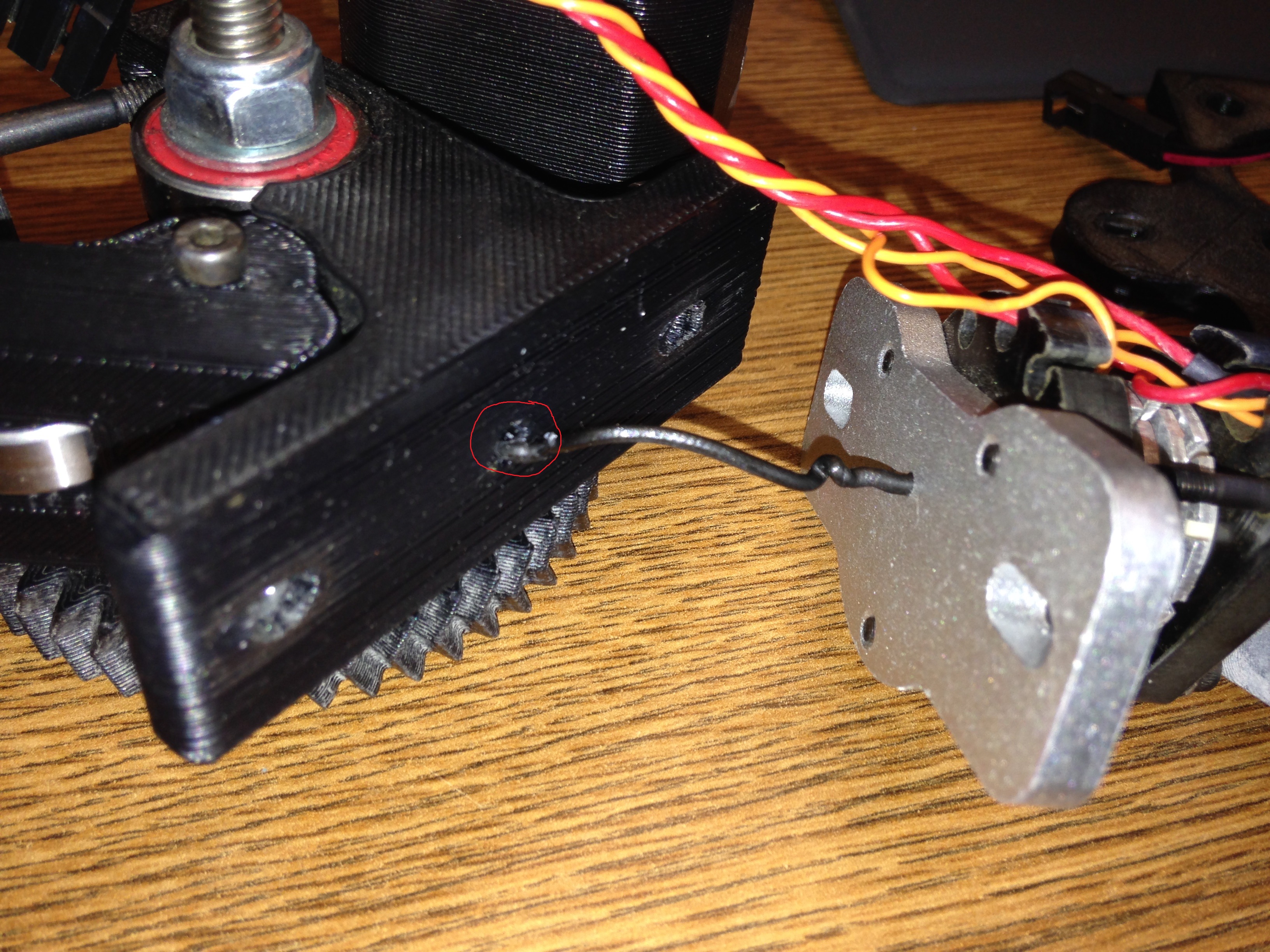
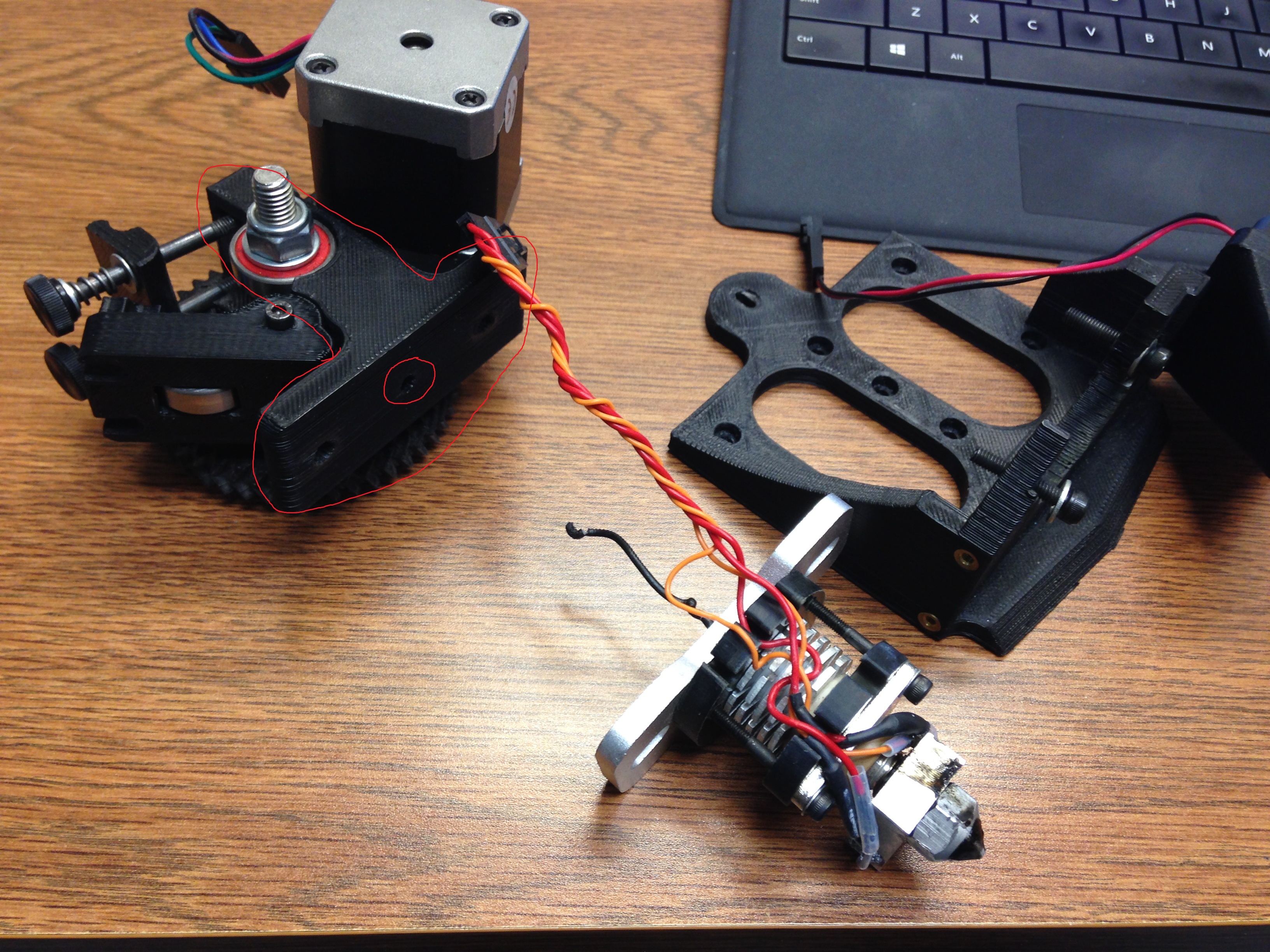
If I may suggest the true nature of the problem is the Direct Drive mount. This plastic piece has a hollow tube that is wide enough for a 3mm filament to pass through. So even if you replace your hot end with a 1.75mm one you still have a tube that is wide enough to allow the filament to bend and kink. Please look at the pictures I uploaded. The first image shows the piece I am referring to. The second image demonstrates the problem.
So what we need to do is modify this piece and print a replacement.
Potentially looking at getting the TAZ 5, but don’t want to mess w/ 3 mm filament, and came across this thread. Was kinda surprised this issue hasn’t come up earlier and already been solved. Is it because of the change from budaschnozzle to hexagon hotend? Is there not something like this (https://www.lulzbot.com/products/budaschnozzle-11-ptfe-tube-175mm-filament) for the hexagon, but a metal sleeve instead to retain the all metal / high temp feature. I assume these (https://www.youtube.com/watch?v=epcxTORf1z8) and (https://learn.adafruit.com/downloads/pdf/taz-4-1-dot-75-filament-upgrade.pdf) won’t work due the same issue, new hotend?
Seems obvious that something mechanical would need to change if you are using a smaller filament. The filament would need to be closely supported on all sides from the point at which the extruder gears apply force, all the way through to the nozzle, or else it is going to have room to buckle. So is it just the direct drive mount, as the previous poster suggested, or other parts as well?
Its really just the hotend… they make a 1.75 version of the Hexagon AO which should be a drop in replacement on the TAZ5. I don’t think the extruder body or hobbed bolt would need to be changed… the idler should provide enough compression.
Some ideas for retrofitting the existing hexagon, 3mm OD aluminum tube, and 1.75mm filament nozzle for the hexagon:
http://www3.towerhobbies.com/cgi-bin/WTI0001P?I=LXBJWV&P=8
http://www.makerfarm.com/index.php/hot-ends/hot-end-parts.html