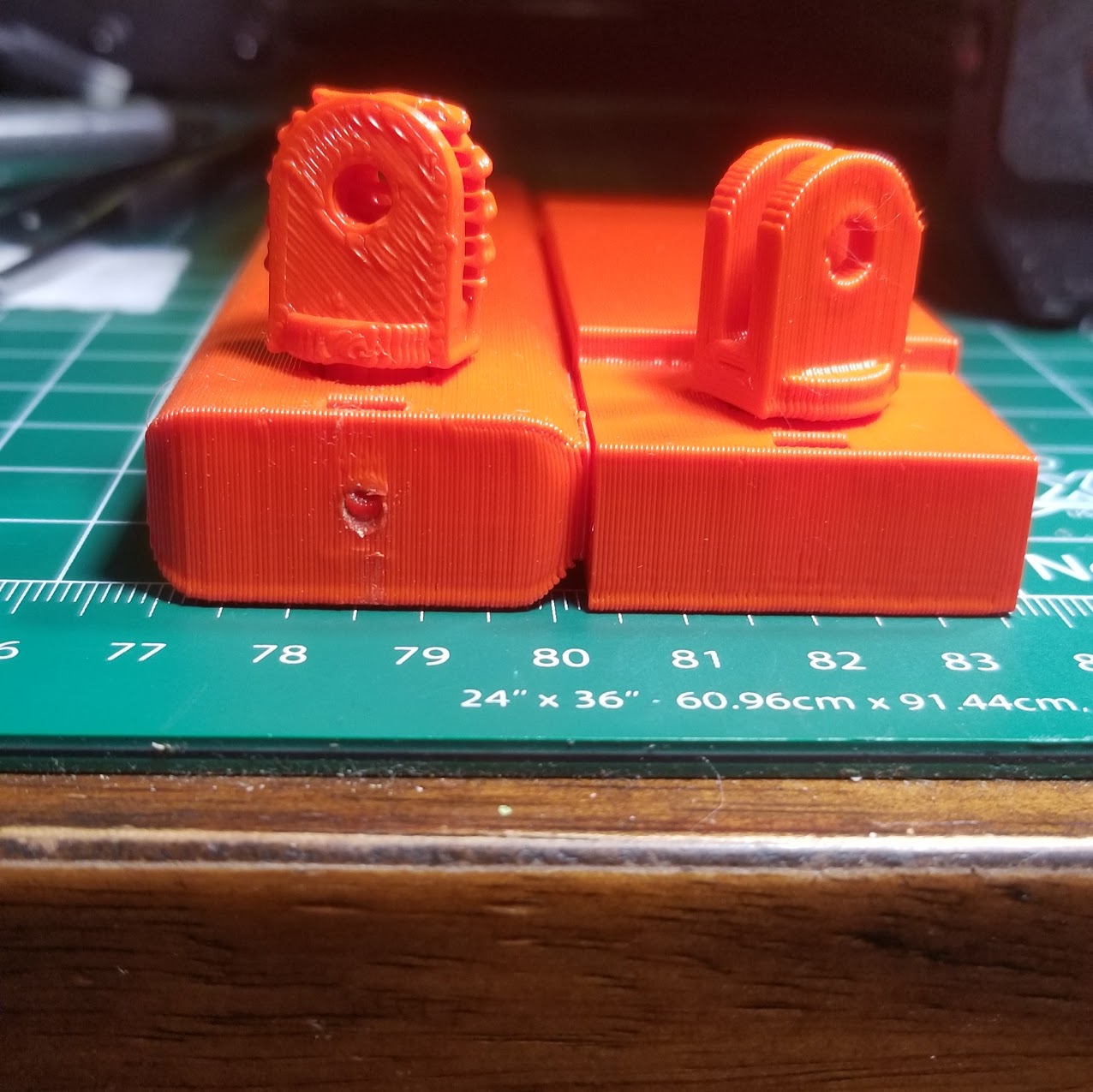
v15b:
Fits perfectly on the clamp
Is slightly longer than v15, so print head will pass freely
I need to find a M3 hex nut, but that is great solution.
Does Not clear big screw, to tall.
v14c: cleared screw nice <---- best height over big screw
v12: barely cleared screw
This mount is best printed vertical. Printing vertically removes the need for support in clamp section. Which helps because its hard to remove supports in small spaces. Can u turn the swivel mount 90 degrees so no support material will need to be printed between swivel mount arms, just support to support it off the bed.
Hmm… I measure the 14C thickness at 8.5mm, the 15B thickness was 4.8mm. Maybe the arm is sagging from the weight of the camera?
Try this one:
increased thickness of arm on top by 3mm.
turned the swivel by 90deg - if you want to speed up the print, try printing on its side. XY axis moves faster than the lead screw, therefore tall prints are usually slower than lower profile prints.
Attach a picture if you can! Send a PM when you see this, or respond… it’ll send me an email notification. We can speed up the response of model adjustments. TAZ5 RPi_Cam_GoPro_v15C.stl (519 KB)
I haven’t even tried to clean support out of swivel arm on 15B, because when I attached to bed plate and moved toward big screw it hit. It hits then passes over. So it needs a little more clearance - adding the cam would be even worst sag.
Thanks for turning the head in the model. It will definitely help with not having to clean support out of small places.
We are the closest we have ever been.
Overall length → good
Clamp fits → good
Metric nut and screw to hold swivel head works perfectly. (picked some up from hardware store)
If printed vertical no supports to remove between clamp or swivel arms.
I think in v16 you forget to put the little hole back for the screw that goes to the nut to hold swivel head.
Since I never had M3 screws to test, I didn’t realize they would add more height to the bottom of mount as it passes that big evil screw. My hardware store only had M3 screws with button heads. So they stick out the bottom even more. Bad.
Online I found these:
m3x10
m3x12
m3x14
They have tapered heads. Which would be better because they can screw in flush with bottom of mount.
Ideally u build a fillet or tapered edge into those holes on bottom of the mount to better allow screws to be flush.
And or take more height off the bottom of mount.
Sounds like v16 works for the most part. If I’m following correctly, you’re saying when the swivel is locked down by the M3 screw the bottom of the swivel tilts down and hits the frame screw again. Can you try pressing the swivel flush with the bottom before locking the screw down? I’ve noticed that it tilts from the “play” required for it to rotate… With the addition of the hex nut, you’ll have a lot more leverage to lock the swivel in place vertically so that the bottom is flush.
A socket head or button cap should be perfect since it would sit on the flat surface. I don’t have any counter-sunk screw heads…
Let me know what other modifications you’d like to see. If no more we’ll call this complete.
Swivel is fine, causes no issue with big screw.
Im saying v16 is missing the hole on the plastic the allows the m3 screw to make connect with the swivel lock nut.
v16 hits the big screw, without the cam attached. Needs more clearance. But also if locking screws are used on the bottom they will stick out unless you taper or fillet, or hollow out the screw holes on the bottom.
moved the plate clamping holes wider apart… hopefully clears the frame screw. There is minimal material to work there ~1mm. So countersinking is probably out of the question. TAZ5 RPi_Cam_GoPro_v17.stl (501 KB)
Clamp fits on metal sheet snugly - GO
Clearance above Y axis pulley screw - GO
Swivel lock nut, holds swivel mount securely - GO
Since printing vertically works best for no support material in areas that need to interface with other parts. What do you think of adding holes in the top clamp half above the nut holes in bottom. Holes big enough to allow the nuts to be placed, post print completion. This would allow a person printing vertically to have the extra security of a horizontally 3d printed mount with nuts printed inline.
Other notes for potential users:
If printed horizontally, you will need support material for the overhang of the clamp section. I would only advice printing horizontal if your support material leaves zero traces. The tolerance of the clamp on the metal sheet has to be spot on, support traces will prevent the clamp from fully attaching to bed. But you will be able to pause the print and install the nuts into the clamp section.
Printing vertically, with support everywhere saves you from condition above. The clamp section and swivel head will print cleanly, no supports to remove from important tolerance dependent areas. However you will not be able to install the nuts that go into the clamp section. The mount hugs the metal sheet nicely even without the nuts. Matter of fact if you apply pressure on the back of the mount with a cam attached the metal sheet will flex. Some may feel this is risky and want the nuts and screws helping the clamp stay in place - so your choice.
Best printed in abs or other heat resistant plastic. It is attaching under the hot bed after all. Also ABS had a tighter dimensional accuracy for me. PLA printed slightly bigger, bad for clearance)
Print settings that worked best for me:
Rotate the model so it prints vertically.
IC3D ABS filament
.5 nozzle
245 - Print temp
95 - Bed temp
2mm - Shell thickness (4 perimeters)
2mm - Bottom/Top Thickness
10% infill - Minimum
Support type - Everywhere If printed vertically, swivel head shaft needs support inside mount body or print will fail. And just as important, outside swivel head needs support above print bed)
idk if you plan on adding holes to top section of clamp, but its very usable at this point… you could upload to thingiverse as a finished design or work in progress. I think its better than all current buildplates mounts for Taz 6 on thingiverse.
Thanks for all the feedback during this process. Glad we finally got to a finished project.
Great tips on printing also… putting it on its side never occured to me for reducing supports.
There are 2 opening which fit a M3 Hex nut in the bed clamp portion of the mount. I think you’re referring to what we decided on later in the project with the swivel lock hex nut. Basically an opening which allows a hex nut to be slid into the mount… rather than the existing version of placing the nut in the clamping portion. Probably possible… Scratch that… its attached.
Let me know if that works. There’s about .95mm above and below that opening. It should be okay for the stress it needs to take from clamping. If the tolerances for the hex are good, than it should almost make that area solid. I guess I could make some corresponding inserts to make that area almost solid. TAZ5 RPi_Cam_GoPro_v17B.stl (556 KB)
Those openings for nuts should really help if users decide to print the mount vertically.
Had to print some stuff for the misses. Printing v17b now.
Planning on going back to the hardware store tomorrow. Wanna try different size screws for locking the swivel head in place:
M3 6mm - to short
M3 10mm - to short
M3 20mm - to long
Will try M3 12mm and M3 14mm next.
The M3 hex nut for swivel head has been fine.
As for the clamp section, I suspect M3 hex nuts will be fine too. When printed horizontally they fit perfectly. My hardware store only had M3 6mm screws no M3 5mm, they should be fine for clamp section. I’ll verify and report back.
@ kcchen
Had a very hard time getting the hex nut into clamp cut out. I tried so hard I ended up deforming the plastic. Once the plastic deformed the nut would spin as I tried to turn the screw.
After work I’ll print another and try heating the nut up, and or lowering flow rate.
Also even though in my android slicer and lulzbot cura I see there are cuts outs on opposite sides of the clamp section. Only one side printed with a cut out for the hex nut in clamp. The other side touching the bed printed missing the cut out, im puzzled because the both slicers rendered both cut outs.
On my phone, pardon the crude drawing. I’m not sure this idea will help. Cam Mount needs to clear big pulley screw that’s why it’s thin on bottom, and needs to hug the metal sheet. I don’t know if putting holes in top section would help. The idea would be 2 holes maybe 1.5 bigger than M3 nut directly above nut placement bottom section. Then user could simply place nut thru top clamp down into bottom clamp. I think putting the nut cut out plus the slot to slip it in, is just to much for thin plastic area. (This feature has so little plastic to work with it may not work as u suggested, either of our ideas)
Hmm… I’ll check the model and make sure there isn’t some issue with those cutouts…
I use RTL Fasteners for my metric hardware… they are on the East Coast and I get stuff in two days. The M3 hex nuts are 2.5
EDIT: Here’s 17C. There were some issues with the holes after adding the slots for the hex nuts. The plugin I use to check for manifold was filling in the screw holes on one side. S3D slices the model ok. Still a little worried that there’s not much material to provide a good clamping affect. Also made the new hex nut slots a little bigger (2.8mm) TAZ5 RPi_Cam_GoPro_v17C.stl (564 KB)
Slightly bigger cut outs for hex nuts helped a lot. Clamp section nuts only need a little push in, but that helps to lock nut in place while screwing the screws in.
Clearance under mount is good. The big screw passes between the screws on the mount. Zero sag in mount even with gopro and arm.
M3 6mm Button head screws are not ideal. But I couldn’t find flat head 5mm are my local hardware store.
I want to do a couple of test prints, because I’m not sure if the metal sheet and build plates flex apart where the mount pushes under the buildplate. If all goes well its a done deal.