I have a Sidekick 747, and it recently started printing with layer offsets (see photos). When I printed a calibration cube, I noticed that the offsets were only on two of the faces (opposite the X and Y markings). I printed the cube with the X and Y markings in the +X and +Y direction, so these layer shifts appear to be in the -X and -Y direction only.
I checked Z offset and re-tightened the stepper set screws. Is there anything else I should be checking to try to get my layers to print straight again?
Could be a part cooling issue.
What does a cylinder look like printed in the same location?
Try printing on a different area of the bed as well. Could be a draft you aren’t seeing affecting cooling in that area.
1 Like
Hi @Wrathernaut,
I closed the door to my enclosure (which I usually keep open for PLA) and printed 5 cylinders (1 in the center, 4 toward each corner). They all came out pretty solid looking (like the one in the photo). I then printed another calibration cube (center, enclosure doors closed). It looks a little better, but there’s still clearly some layer shifting (only on the -X and -Y sides). Why would a cylinder print better than a cube?
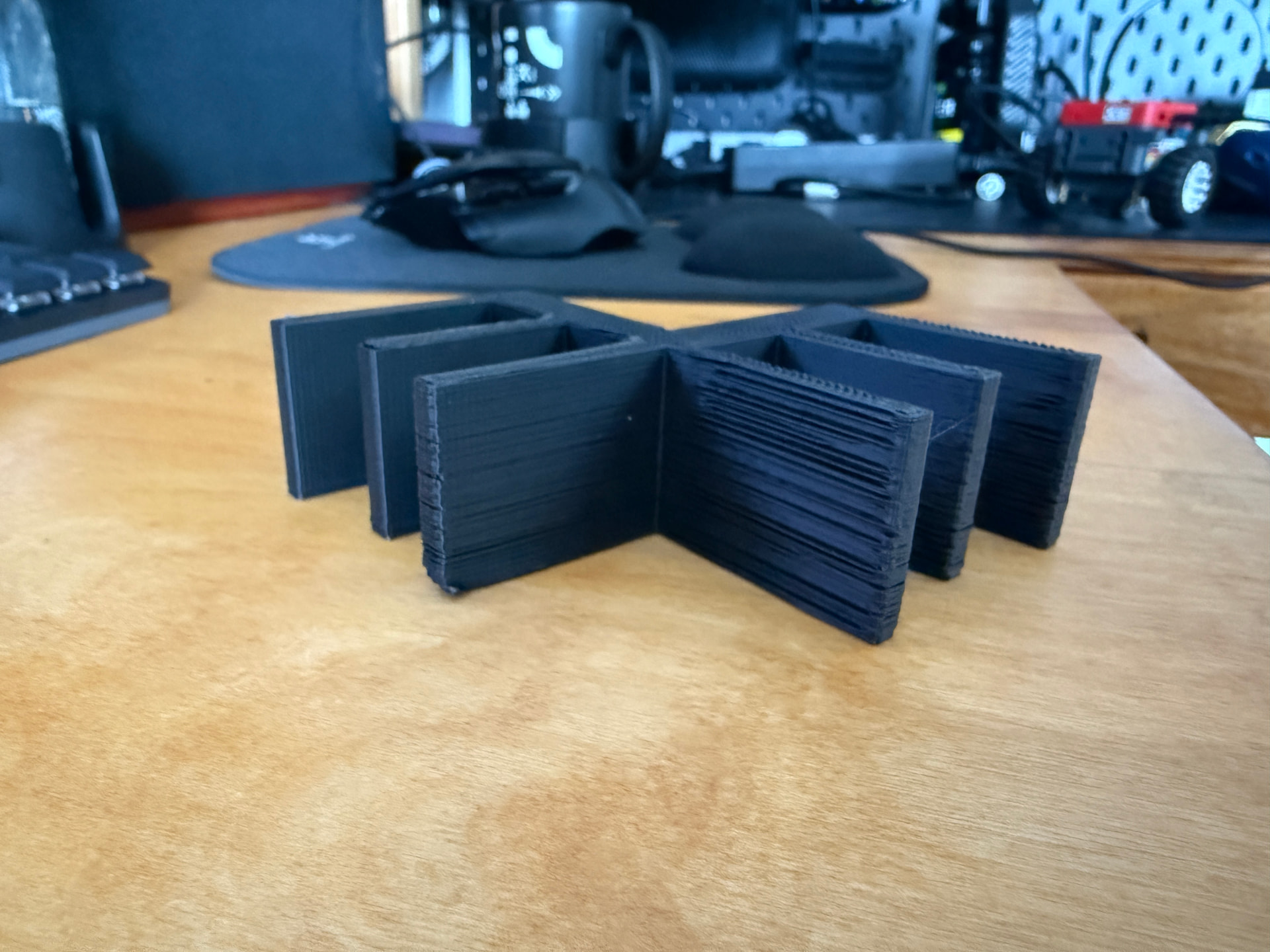
The cylinder keeps both x/y constantly engaged and in motion, which might be making a difference, instead of a single axis in use at a time. It might help to see if it’s the direction the toolhead is moving, and not whether it’s front or back. A test object like the attached should include motion in both directions along “back” and “front” faces to see if that changes a thing.
E-Mesh.stl (4.4 KB)
Have you verified the x and y belts are tight and there’s no binding when moving?
That’s one of the ideas I’m tossing around - that it’s binding when starting from a stop, but maybe only in the one direction, and it’s always going the same direction in the back or left side, so maybe some lubricant was put on the rods, and it’s damaged the leading edge of the linear bushing, so it stutters when going one way, but if it’s already moving it slides reasonably well, so continuous motion in a circle ends up being ok.
@Duanecr The belts are tight (make low guitar-like sound when plucked). I don’t visibly see any binding.
@Wrathernaut I printed the part you posted. Here is the view of the +X/Y side:
Here is the view of the -X/Y side:
I have not added any lubricant to the rods. Maybe something got into the bushing? Is there an easy way to check and/or clean them? I’m assuming I’ll need to disassemble the head.
Is your nozzle damaged, or the toolhead loose or slanted at a diagonal?
Hi @Wrathernaut , the nozzle and toolhead seem OK to me. It has a little play back and forth on the X rail (maybe less than a mm), but I figured this was normal slop. If this was the issue, I’m not sure how it would only affect the -X and -Y faces.
[edit] Clarification: “back and forth” slop meaning a little play rotating around the X axis, I do not feel any play along the X axis while the steppers are engaged.
My initial response is that the problem is the replacement support parts of the toolhead (in red). If it’s been printed in PETG, PETG-CF or PLA, or any other lower-temp plastic, it’s very likely that it is experiencing creep over time, which is accelerated if it’s used in a hot environement (like an enclosure). Creep on those parts would pitch the toolhead and the nozzle forward since it hangs off the front of the rail, and tilt to the right, since the motor is the heavier side of the toolhead. That would account for the bad rear and left faces.
If you still have the original lulzbot-printed green parts, replace them and see if that helps the problem.
Hi @Wrathernaut , so those are the original stock parts. The printer is the special DigiKey edition, which came in red: https://www.digikey.com/en/products/detail/lulzbot/KT-PR0058-BS1MLRP/16186574
I wasn’t aware of that variant.
While the consistency of the location of the bad layers still makes me think the nozzle is pitched wrong, it’s likely there’s a belt tension issue. The sidekicks have adjustable tension knobs, so I would give it an adjustment and try again.