That alignment isn’t important. The important thing is to keep the left and right hole inside the tolerances.
BTW the drill templates worked very well for me when I did the conversion 
First i set the guides on top of eachother to make sure they printed dimensionally equil. Assuming I have 2 that are good and accurate, I place them on the bed, center them as best I can by eye, then loosely tighten 4 of the 8 possible M3 bolts (2 per side) so I can still see the mounting holes. I then use a T square to line up the two guides on their short edges. The only dimension that is important is the X direction allignment. You can have the drill guides as close or as far apart as you need on the Y direction. I usually push them as far apart as they will go just because the extra bit of distance makes for a theoretically slightly more stable platform. Once it’s alligned there, I tighten the M3 bolts down, add the others for good measure, and move to the drill press.
Hi
I just wonder how you guys manage to screw the top part of the v rail as the hole is too small and not threaded? Please see the pic I just compare the size of M5 bolt to the hole.
This is the rail I bought

Well, for starters thats the wrong rail. You need the 40mm wide ones for the Y axis. But you will also need an M5 tap to thread that hole.
I see, so we need to manually tap those. What kind of tap do you recommend for this application?
actually there are 4 of 40mm and 2 of 60mm v rial in the pic for your X and Y project, I bought some spare just in case something mess up.
Aha, that makes sense. I used a straingt M5 open tap for mine. The spiral ones should be fine too.
Printing the parts for the Y axis instruction guide, which will be layed out similar to the X axis one. Aside from the new Y axis belt tensioner and the Y maximum endstop piece, anyone have anything in particular they would like addressed on the Y axis? Also anything you would like to see different from the X axis document? please let me know.
hmm… Did you make a new Y belt tensioner? I am about to adjust the tension on my Y belt, for it rattles when moving toward the home position. But if you have a new belt tensioner, I would love to print it!
Yes. It’s still in Alpha testing. i haven’t even printed all the pieces yet, but here is what it’s going to look like, and the parts. Basically this will require another hole in the Y Idler Endplate, a new bolt and nut, and 4 newspacer thingies. Optionally it will also have a mount for a Y maximum endstop and a replacement belt mount with the Y Maximum Endstop Target. The theory is that the new bolt goes through the Y Idler end plate in the new hole, and into the new Nut in the idler block. Turning the bolt tightens or loosens the idler. The idler is prevented from rotating by the 4 spacer thingies. I’ve used a similar design to this on my slightly modified AO-10x for years and it works great. This also slightly shortens the belt path, which always improves accuracy (less belt, less potential belt give.)
There will be a thread with pictures and part lists and whatnot as soon as I go get the parts and verify that everything fits. I wouldn’t reccommend printing this one yet unless you want to help me test it, as it is not a tested product yet.
Belt Tensioner Belt Mount 1_0_a.stl (72.4 KB)
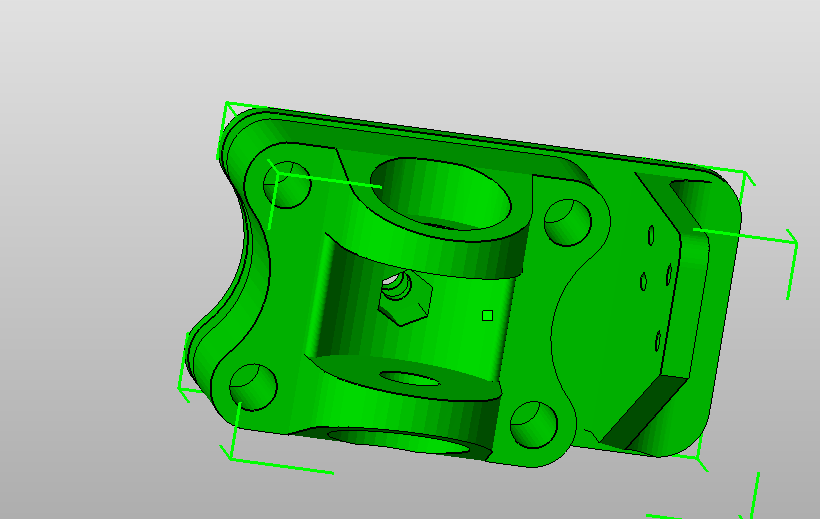
Belt Tensioner Body.stl (127 KB)
Belt Tensioner Z max Endstop.stl (81 KB)


Taz 6 style corner pieces. You will need the flexy foot and heat set inserts to use them. They can also be used on a Taz 3-5. the bed allignment for that piece is largely unchanged.

1 more motor mount and 3 more cable chain anchor tiny parts to print, a pile of heat set inserts to install, and then I can start the assembly photoshoot finally.
Openrail_corner_2_0_a_Taz6_foot.stl (204 KB)
There is now a larger “all the holes on one plastic thingy” drill guide if anyone wants it.
Taz Openbuild Y super mega combo drillplate.stl (824 KB)

That must take hours to print… I think I’ll try it when I’m done tinkering with auto leveling. I am still tinkering with my design 
2 so far!
There is a slight delay on the Instructions document. i thought i had more than enough M5 T-slot nuts to put this thing together, this thing disagrees with me. More are on the wat, but now i have to wait for shipping.
Taz 6 bed plate specific drill guide. The stock bearing mount holes in the Taz 6 bed plate are 4mm offset, 2mm per side compared with the stock Taz 1-5 plate.
Combined Drill Guide Plate_TAZ 6 ONLY Variant.stl (471 KB)
Finished all the pictures. Tomorrow the document gets written, then this one will finally be done.
Perfect timing. I’m about 80% of the way through both the X and Y axis upgrades.
Ran out of filament before more arrived…
Thanks for all of your work on these, and for putting together that TAZ 6 bed guide.
You’re welcome! assembly guide is almost done, I’m on page 39 now.
Taz 6 Drill Guide.zip (5 MB)
Here is the official 1.0 Draft Instructions document for adding the Y axis Openbuilds rail to a taz 3-6 printer. Please take a minute to look it over and let me know if anythign in it needs clarified or changed if you get a chance.
I would also like to Acknowledge the support of the Openbuilds Fairshare Program (OpenBuilds Fair Share Give Back Program) and IT-Works (https://itworks3d.com/), both of whom provided funding or parts for the assembly used in this instruction manual. Thank you for helping me bring this instruction manual to people attempting this modification!
Z axis instruction manual is next, I’m waiting for parts on that one currently
Instructions for adding an Openbuilds Y axis to the Lulzbot Taz 3 4 5 or 6 3d printer 1_0_a.pdf (14.6 MB)
Piercet,
Thanks for this! If you want to feel free to include the acrylic front and rear mounts. The file is on thingiverse and in this thread. If you would like I’ll update it to have the center hole for the tension adjustment.