TAZ 6 Troubleshooting for Student Use

Thank you for the clarification. OK, I’m going to run something on default settings thru Cura.

If push does come to shove and we want to look into things like new gears, other printed parts, etc.–would it be more worthwhile to print our own parts or just purchase them? (We do have other 3D printing labs, and they can print in more sturdy materials like ABS or possibly even nylon.)

Honestly, it’d be nice if there was just a clear sort of guide to determining what the heck the problem is. Start with the filament, next check the extruder/hotend, then the gears, then the hobbed bolt, etc. Maybe I’m just at a time in the TAZ 6’s operation cycle where people who have been using them since their release (pre-2016?) know what they’re doing, and people who are getting a used one now are sort of left scratching their heads, especially if they’ve only dealt with the more “solid” Prusas or even relatively stupid-proof Enders (AnyCubic, Elegoo, related drop ships).

I really appreciate you taking the time to help walk me through all of this. I know some of my questions might seem silly, but I’d be getting nowhere if not for you and the support of the community, so thank you.

Something else I’ve been thinking about…

I just looked at this OHAI article about prepping the bed for printing, and I think this may be part of the issue–I don’t know if we have a scuffing pad to properly prep the surface for printing. (I could probably track down some very fine grit sandpaper to do the job.)

Could possibly help with some troubles surrounding adhesion on the first layer (like the filament kicking up and attaching to the nozzle).

This print through Cura isn’t going awful per se, I think it could be going a lot better but could also be going a lot worse. This is only the first layer, though, so who knows. (And yes, those are some large scratches in the topmost PEI sheet–the glass beneath isn’t cracked, so it’s not all that awful.)

image

I’ll drop another update in a little bit to see how this print goes.

These lulzbots are very simple machines, so you just need to break it down to the basics. Like old engines where the questions are “Air? Fuel? Spark?”, these machines are “Heat? Clear filament path? Extrusion force?”. Just find which is the problem, then start looking at causes. If those three things are working, it’s down to tuning… and if you revert to the known good slicer settings, you can start tuning from there.

1 Like

I suppose you’re right. I think, much like anything I’ve worked on previously, I have a tendency to get caught up in fine details when the big picture ought to be the main focus.

As far as I know, our “good slicer settings” are going to either be 1. the default Single Extruder TAZ 6 preset in Cura or 2. the imported Single Extruder TAZ 6 preset designed for PrusaSlicer.

I can at least say that heat should be no issue. There have been no observed temperature fluctuations when printing or heating to any temperature.

In terms of a clear filament path, it seems to be alright for the most part–filament goes in, filament comes out. It just seems to struggle to extrude at a consistent rate when printing.

“Force” could mean a lot of things in this context. Force from the feeder gears? From the hobbed gear? I guess I can’t say for sure if the extrusion force is right or not.

Here’s what we have for results from the most recent test… this is all default print settings in Cura. High speed/.38mm layer height. Pretty rough, stringy, and seems to come out in spurts/blobs. I don’t know if I’ll be able to fit in another print before I leave for the weekend, but this is essentially the baseline.

The skirt looks like your Z offset is too low. With the default PEI on glass, offset should be about -1.25mm to -1.32mm. If your z offset is in that range, then the probing isn’t getting done well - usually dirty nozzle.

The .38mm fast profile isn’t the best for diagnosing, but this looks like very damp filament, or a bad temperature match for the filament. If it’s a “high-speed” PLA, they usually need a lower temp. That’s tuning though.

The finish on the extended fingers and top really look like too much heat as well.

Is your thermistor accurate?

Z offset is definitely something I’ve been toying with. IIRC it’s currently at -1.200mm, but I’ve adjusted it above and below that offset before. I do feel concerned about the probing, though. For the last few tests it’s been probing fine, just poking the metal washers gently, but it may still be dirty (the abrasive pad does leave residue on it, so I’m thinking of picking up a scrubbing pad to clean the nozzle itself and replacing the abrasive strip on the printer). Or is it more worthwhile to remove the nozzle entirely and replace it with a fresh nozzle?

Filament is brand new. Should not be damp at all. Temperature was set to 205 the whole time. It’s PLA, recommended temps on it are between 190-250 (though I generally wouldn’t go above 215 for PLA).

With all of that, I’m wondering if the thermistor is accurate or not. I’m sure we have a multimeter lying around somewhere to test the electronic component, but I’m not sure if we have a laser thermometer (scratch that–we probably have one somewhere from early COVID policies). I suppose if that’s inaccurate, that would need to be replaced.

You don’t need perfect accuracy with the thermometer - just to make sure it’s not at 250c when you’re expecting 205c.

Makes enough sense. I’ll try dropping the PLA temperature down in some increments and see what happens.

I’m very suspicious of that tool head, I wonder if he mind find something better used? Something like the E3D Titan Aero based hot ends or jump into the M175 (it’s a hefty price tho).

With the odd flow, I wonder if a PID tuning might help

It’s Monday and I’m back with the monster… I mean the TAZ 6.

I’m going to run a test with the temperature, going between 190c and 180c.

If it gives good results at 190: great! We’ll just run PLA prints at the low end of temperature. This could just be that it’s in an open area that often has other printers running around it. Maybe there’s some heat leaking.

If it gives good results at 180 or below: I’d be inclined towards a borked thermistor. This thread talks about a 100k thermistor, I’m assuming that’s its “rating” and what would be required. Looks like Lulzbot themselves don’t stock the thermistor anymore and we’d have to find a third party replacement…

…But going all of this keeps making me think back to “what if I have to go deep inside of it to fix it” and the worse thought, “what if I go deep inside of it to fix it and find out it was something so stupid all along”… I’m wondering if it’s just time to go in and really look at it, since adjusting all these other parameters doesn’t seem to be helping all too much.

This is how it’s looking even with the temperature at 180 and at half the normal speed.

I feel kind of dumb for bringing this up now, because maybe, just maybe, it’s something that should have been brought up earlier… but when the gears spin to retract while printing, there’s a pretty significant “clank” or “clunk” noise, like plastic on plastic… could this be an issue? Could this play (or what I’m assuming is play) lead to poor extrusion results?

Okay, I’m going to get back to fiddling with it…

Well, the whole thing with this machine is the fact we essentially received it for free–the Engineering college stopped using it, and they were essentially going to toss them out. We took two out of their four TAZ machines.

I think eventually it will get into “sunk cost” territory–that is, how much are we willing to spend on a printer we got second-hand in vague condition before we just say “oh screw it, let’s just buy another Prusa”?

We want it to work, so badly, of course–and I have a bit of pride riding on it (everybody wants to be a good student and good learner!). But I’m just not that experienced in the realm of, well, this. I can take things apart and put them back together with instructions. I’ve assembled cheap furniture, fiddled with computer components, and replaced parts in my handheld electronics. But the 3D printer almost seems insurmountable, especially since I’m doing this for a professor that I deeply respect and admire!

I won’t allow my pride to get in the way of my work. I’ll do whatever it takes.

Also, RE: PID tuning. I’ve never heard of that! That’s a good thing! I found this info guide all about it, maybe it should help with my troubles. Hell, if it could fix even one problem in the myriad of issues I’ve been experiencing, I’d be happy. Because one fixed problem generally leads to another fixed problem… or another new problem, but hey. The only way I could make this worse is by taking a hammer to the thing and smashing it to BITS!

Or snapping the wires with my clumsy hands. Can’t tell you how many scares I’ve had in that sense.

Well, I’m going to look at this guide and see what I can do in terms of tuning. I’m also going to look closer at our gears and see if, hey, maybe one of the screws are loose and need to be tightened up a bit. I don’t know if we have the original assembly tools that came with the machine (probably in professor’s office), but we do have lots of other tools lying around the lab that will work just the same.

Thanks so much for the idea. No suggestion is stupid, even if you think it’s a no-brainer, remember that comic about average familiarity.

Hi,

I totally get it.

For calibrations, Teaching Tech is really the Gold Standard. https://teachingtechyt.github.io/calibration.html
He not only explains in great detail what and why, but usually has video demonstrations too.

Going to the basic steps.

The nozzle is clear, since you have no trouble pushing it by hand.

The temp is close enough.

With a clear nozzle and proper temps, that means the extruder is likely to blame.

The physically weakest part of the extrusion system is the small herringbone gear on the motor, then the motor itself. I’ve also had a stepper motor on the single extruder go out, and replaced a couple of those small gears.

I’m guessing you have another NEMA17 to swap in there? And using one of your other printers to print up a new small herringbone gear to put on it is definitely worth a shot.

Beyond that, it could be the stepper driver, which you can test around by using a firmware build that uses the second extruder stepper driver for the first extruder. I’ve got a build of the firmware that swaps extruder drivers here: Incorrect Extruder stepper motor wiring killed my Rambo? - #5 by Wrathernaut

Just flash that firmware and swap the plugs for E0 and E1 at the control board.

This would be a cool effect if not for it coming out of errors.

Well, maybe? Professor might have one lying around, we might be able to scour for one either in our 3D printing lab or the lab that’s still in the Engineering school. If not, they don’t look awfully expensive on Amazon… unless there’s perhaps a specific brand or maker you recommend

We could do that, though I’d be concerned about printing the gear in PLA. Thankfully our other labs can print in stronger materials, like ABS, so I might go to them tomorrow and ask.

This part sounds like I’d have to go in and mess with the electronics. I’m not necessarily opposed, and I suppose if I’m replacing the gears (and perhaps the motor), I’d already be close to that level.

I’m going to run the PID tuning like @WhereNerdyIsCool suggested, and see if that helps any. Regardless I’m definitely going to look into a new stepper, and I’ll get those gears printed. Hell, I’ll print a new large gear too, because I might as well…

PID tuning ran. Seems to have gone OK.

I texted my professor about all of this and his recommendation seems to be to take a few steps back and return to basics, again–there could still be a clog in the system, and/or the hobbed bolt might be eating away too much at the filament and causing gaps.

First I’m going to run an atomic pull and see if I can’t get anything out of the nozzle. Then, I’ll check out how to loosen the hobbed bolt so it doesn’t pull so dramatically. Then, after that… another test print.

We’re looking into picking up replacement nozzles so we may just end up doing that… will update on how that goes if/when that happens.

Quick update. I used one of our other printers to print out the latch jig mentioned in this thread and adjusted the latch screws accordingly. I’m not sure of how much this will help, but it’s a step in the right direction.

Next: if there’s a clog, like my professor suspects, it’s either inconsistent in its cloggery, or just enough to screw up prints sometimes. And pull after pull, the hobbed bolt only seems to be digging in so much! Just enough to push the filament, that’s what it looks like to me, if a bit tense. And of course, when it purges after loading a filament…

That looks normal! That’s what baffles me about all of this, is that parts of it work that you wouldn’t expect to work. The things that don’t fail are the things we’d normally look at when a printer isn’t behaving correctly. And the things that do fail almost feel like they have no rhyme or reason to their failure, unless it’s a needlessly complex problem or a super simple one that we’re overlooking.

Edit: I screwed up in the slicer, disregard prior images

I’m nearing my wit’s end… not saying I’m giving up, but man this machine is driving me nuts. I’m close to just taking a video of it and seeing if anything can possibly be diagnosed from that.

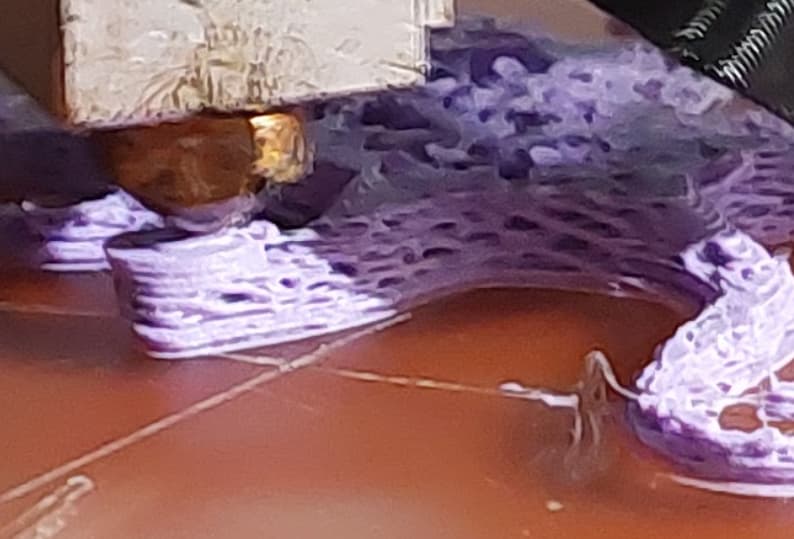
That doesn’t look like the extrusion of a 0.5 nozzle. Looks like 0.8 or larger. Me thinks you have it set to 0.5 and that explains the squished layers and under extrusion.

1 Like

This is what a 0.5 nozzle extrusion looks like. I tried to recreate your picture using my incredibly bad photo skills.

Well. Could it have been this whole time, most of my problems have been caused from the nozzle not being stock?

I guess it’s possible.

Well, good news, I guess: in my wake of frustration and haste, I managed to bust off the screw part of the nozzle inside of the heat block, so I ordered a new nozzle and a reverse/inverted screw to get the remainder of my destruction out of there.

Well, I appreciate the reply. If this fixes it, I will be infinitely grateful (and probably infinitely smacking myself in the head for not thinking about this earlier).

The nozzle is stock, but, that’s not a Single Extruder.

That’s a MOARSTRUDER.

That explains a lot.

Trying to extrude .5mm worth of filament out of a 1mm hole isn’t enough to have a contiguous bead of plastic, and it just goes wherever there’s less resistance instead of lightly squishing onto the previous layer.