Soooo… take a dose of, printing a rock-o-puss with HIPS… with stock Cura…
And get back with me tomorrow…
Thanks guys,
I re-“seasoned” using extra virgin olive oil (LOL) and made a print last night with no problems. I’m trying another right and will report back.
@DawgBone, no offense, but if you read the whole long saga, I have had perfect prints & failure using the same slicer, computer, g-code, roll of filament etc.
It looks like you are printing hexagonal infill there, and very small hexagonal infill at that. One thing about hexagonal infill in particular is that it is very hard to print because of all the constant angle changes and retractions that the printers like to throw in with that particular style of infill. Even with a really well dialed in printer I find that hexagonal infill will fail on a larger part about 40 times more likely than a filament strip failure on any other material. I’d switch back to rectilinear infill and see if that helps the problem if it were me.
Two more good prints.
I got an email from Ray from Lulzbot and he steered me to this post:
https://forum.lulzbot.com/t/taz-5-pla-random-clogging-issues-and-a-solution/1661/1
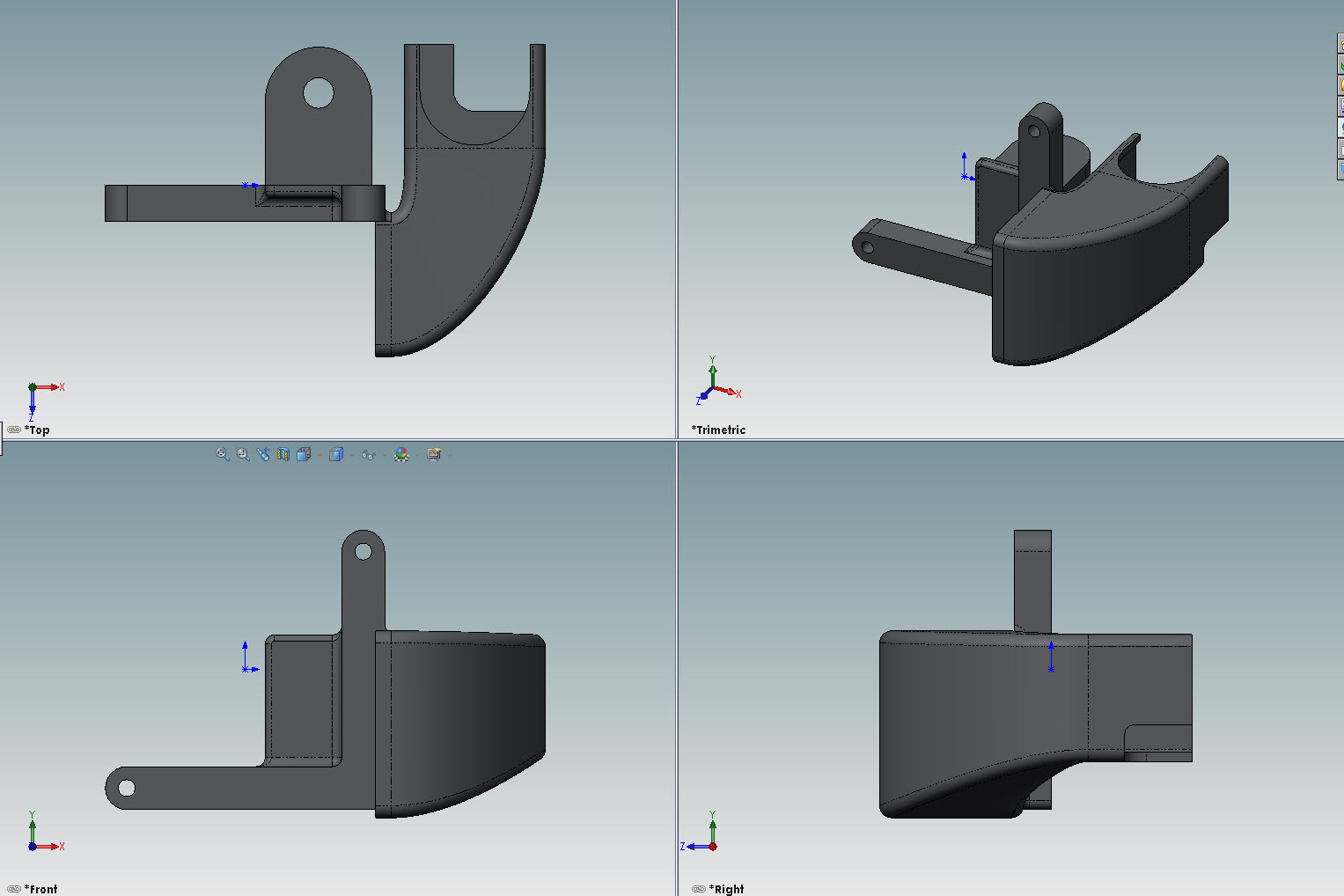
Which I can’t believe I haven’t seen with all of my looking around for answers. Anyway this guy JLC_Designs has EXACTLY the same problems I’ve experienced. So I am now in the process of designing and building a fan shroud based on a fan I got from a client for a job.
I’ll report back with files and links to the fan if and when this works.
Piercet,
Thanks, I will look into that as well.
Try pointing the heatsink fan down at the lower fins and heatbreak. I think the fan does a sufficient job in cooling, but it’s cooling the upper heatsink instead of the lower half.
None taken… Cheers 
I admittedly have not read the entire “saga”
I was only trying to emphasize on troubleshooting…
Print a shit-ton of Rock-o-Pussies, with absolute stocker settings…
And let LB’s support figure it out…<—amazing support!!!
Otherwise, you have much more patience than me…LOL
I would have given up a week ago, returned it, and bought something else… 
Hello All,
OK, to any of you that told me that my issues were from heat-creep and I ignored you; MY HUMBLE APOLOGIES!!!
After many an email exchange with Ray from Lulzbot, he sent me a link to another poster on this forum that was having the same issues and fixed it by adding a larger fin cooling fan.
https://forum.lulzbot.com/t/taz-5-pla-random-clogging-issues-and-a-solution/1661/1
So after I read that, I went and made this:


Not to re-invent the wheel, but because I had this fan laying around that I got from a client. (note to self: remind wife why I save all of this “crap”).
I printed this and then made some changes, so I’ll need to print it again, and if all is well, I’ll post it to Thingyverse and put a link here in this thread.
Anyway, thank you all, and let the "I told you so"s begin!
The fan shroud has been working really well, with two exceptions, one last night and one this morning.
I’m still getting plugging/clogging/extrusion issues every once in a while:

I get a few layers that just crap out!
Check the retraction settings… minimal to none as long as the filament doesn’t ooze when the hotend is traveling. I’m thinking some of the molten filament may still be retracting into the tight heatbreak…
kc,
Thanks. I printed another one right after that, that turned out great! After the new fan/shroud combo, I was having great success, but I was getting the “stringys”, so I went from 1.5mm retract (KISSlicer calls it suck/prime) to 2mm.
I just think it’s minor adjustments now, which I am more than happy to do.
Hi all! Muggs, glad to hear you’re having great luck with your prints now. I’ve had better luck with mine, but I still have about 1 out of 10 that will clog / jam mid print. I’ve been using ABS solely since I installed my cooling fan, so user error may be part of it…
I’ll most likely go back to PLA one it becomes available in black again as I seem to have better luck with that. I have noticed that my extruder temps seem to dip below the gcode settings when I’m printing ABS. Not by a ton - I have it set to print at 240°c, and it might dip to 234°c, but it’s still an indicator that “something is up”.
I’ve checked the code from my recent prints, and all of them have the same retraction settings (suck/prime) 1.5mm @ 25mm/s (Cura). I don’t have any issues with stringing on the prints at all, but I do get quite a lot of of oozing while it’s warming up.
I’d love to know how your prints are doing now, as well as if you or anyone else might have some tips for me to help tweak out the last few issues I have with mine! Right now I’m hesitant to print anything over 3-4 hours mostly because I don’t want to have my Taz printing air and boiling an ABS diamond nugget in the nozzle. Again.  Don’t get me wrong, I still LOVE my Taz! I just need to re-build that confidence level.
I look forward to hearing from the group!
- Jeff
Jeff,
I did notice the same temperature dipping thing happening with my version of the fan shroud. I put some tape over the inlet on the fan to lessen the air flow, and now my temps stay put. I was thinking about making a “swinging door” in my shroud to adjust air flow. The tape works but…not pretty.
I don’t know if you can see it or not, but the back side is 85% blocked off by the blue tape as well.

Hrm… To be honest, that was the reason I designed my shroud as I did - so I wouldn’t over-cool the hot end beyond its’ means to keep up. I wanted a good portion of the flow from the fan to go toward the feed assembly / hobbed bolt area. It looks like there’s a very fine balance to be had.
Maybe we can get the help of the Lulzbot guys once more with this one?
The hobbed bolt shouldn’t have any heat issues. Heat from the nema motor should be contained by the small herringbone gear… Add heatsinks to the top of the nema to help cooling.
Interesting that there is too much cooling. Wolfie’s design for the 30x30 box fans might be something to consider.
Wolfie’s design? Do you have a link?
He’s got a thread somewhere on the forums… but I could only find the Thingiverse:
https://www.thingiverse.com/thing:766633
I haven’t yet checked the firmware that goes with the Hex hot end but in the 2014Q3 firmware, you can set the Fan Speed for the Extruder Heat Sink. This assumes, of course, that you are hooking your fan up to the EX_FAN_0 port on the Rambo. You set the temperature at which the fan comes on. I have mine set to 50 C. You also set the Fan Speed.
I believe the fans have to be 24 volts and this is the reason I ordered a 24 volt version of the blower fan you referenced on Digikey.
Kenny
@ gapdev - AWESOME info! Thank you  I’ll be either building a voltage divider to use the fan I have now, or replacing it with a 24v version.
I did some testing yesterday / today. I ran a 17 hour print with black pla. It came out fantastic, no issues at all. The part that I printed was the same part that i’ve been having trouble with in ABS. I did change the overall size by 30% (larger) - totally on accident. Pretty silly mistake, but at 1am these things happen  I’ll post more pics once I get the part cleaned up, but this is the full part, support material and all.

Considering that this particular roll of filament has been the bane of my printing experience so far, I’m left with the feeling that maybe the Hexagon hotend doesn’t have the “oomph” to keep ABS hot enough when there’s a lot of air flow across the cooling fins. Much like a small block chevy has a hard time coming up to temperature when you remove the thermostat - the coolant just flows too fast, and never has time to build up any heat. (Gear head reference. Sorry!) Then again, this is all speculation on my part. I’ve only been around this stuff for… 2 months total. I’m certainly no expert! That’s why I post on here - ask the experts!
Speaking of which, I’d like to take a moment and thank all of you for your time and effort put forth into this forum and community. You guys (and ladies!) have helped me out immensely, and I want to make sure I pass along my appreciation.
THANK YOU!!